

Magic School AI has spread to over 2 million educators worldwide. For many educators, Magic School AI streamlines lesson planning, assessment, and administrative tasks, making daily teaching more efficient. As a teacher who always looks for ways to save time without compromising quality, I wanted to try this platform that promises to transform classroom preparation. Magic School AI is also designed to help in fighting burnout by reducing teacher workload and supporting mental health.
The platform packs more than 60 AI-powered tools for teachers. These tools range from lesson planning and assessment creation to differentiated instruction and IEP writing. Magic School AI stands out with its 93% privacy rating and offers a user-friendly interface that teachers and students can easily use. Magic School AI adheres to FERPA and state privacy laws, ensuring the protection of student and staff information. The question remains – should you add Magic School AI to your teaching workflow?
Magic School AI offers a Forever Free plan for individual teachers who want to explore AI tools. This complete review will look at what Magic School AI can do, its cost, and whether it lives up to its promise of automating time-consuming tasks. You’ll learn everything about the free plan and paid subscriptions to decide if Magic School AI belongs in your educational toolkit.
Table of Contents
What Is Magic School AI and Who Is It For?
Magic School AI caught my attention right away as a classroom veteran. Teachers and principals built this AI platform to help educators tackle their daily challenges.
AI-Powered Tools for Educators
Magic School AI has over 60 AI-powered tools that make teaching tasks easier. These tools are not like regular AI apps – they focus on what teachers need most, from planning lessons and adapting content to creating tests and writing IEPs, similar to how broader AI teaching assistant platforms are transforming education in 2025. Teachers who use these tools save 7-10 hours every week. Many educators report that Magic School AI significantly reduces their workload, allowing them to focus more on teaching. This extra time lets them spend more quality time with students.
The platform helps teachers with:
- Lesson planning and content creation: Creates materials that match standards in minutes
- Assessment development: Builds custom rubrics, tests, and video questions
- Differentiation support: Changes reading levels and makes learning materials personal
- Administrative tasks: Helps write IEPs, talk to parents, and create behavior plans
Magic School AI provides a comprehensive suite of tools tailored for educators, including over 80 AI teacher tools and 50+ AI tools for students.
Magic School AI makes complex AI simple with an accessible interface. Teachers can use guided prompts, dropdown menus, and ready-made buttons – perfect for those who aren’t tech experts. Magic School AI claims to save educators up to 10 hours a week.
Target Audience: Teachers, Admins, and Coaches
Magic School AI works for everyone in education, though teachers are its main focus. Subject teachers get special tools, like math spiral review creators and science lab generatorsSpecial education teachers find it valuable for IEP writing and content adaptation
School leaders can utilize Magic School AI’s enterprise options school-wide. Districts can customize their tools and build chatbots using their materials
The platform gives users plenty of support through certification courses, online training, one-pagers, and video guides. This support helps educators at every skill level use the technology well.
How It Differs from General AI Tools
Magic School AI stands out because it’s built just for education. The tools show a real understanding of what happens in classrooms. They focus on the time-consuming tasks that keep teachers working late
Student safety comes first. The platform earned a 93% privacy rating from Common Sense PrivacyIt follows all the important rules like FERPA, COPPA, and GDPR
Magic School AI knows teaching needs a personal touch. Teachers can adjust everything based on their students’ reading levels, goals, teaching style, and what they’ve learned before. This means every piece of content fits each teacher’s classroom perfectly.
The platform also features Raina, a teaching-focused AI chatbot that knows best practices and offers round-the-clock help while staying FERPA compliant. This special assistant gives better advice than regular AI tools.
Magic School AI truly understands what educators need and builds solutions that work in real classrooms.
AI Platform and Tools: The Technology Behind Magic School AI
Magic School AI is powered by a sophisticated AI platform designed specifically for educators, making it a standout choice among today’s educational technology solutions. At its core, Magic School AI offers a comprehensive suite of AI tools that simplify lesson planning, grading, and classroom management, allowing teachers to focus on what truly matters—engaging with their students and fostering a love of learning.
The platform’s intuitive interface ensures that teachers of all tech skill levels can easily access and benefit from its features. Whether you’re creating a new lesson plan, generating a custom rubric with the Rubric Generator, or developing an Individualized Education Program (IEP) for a student with unique needs, Magic School AI streamlines every step. Its seamless integration with Google Docs and Google Classroom means educators can effortlessly incorporate AI-generated content into their existing workflows, saving valuable time and reducing administrative burdens.
What sets Magic School AI apart is its commitment to responsible AI. Built-in safeguards protect student data and ensure that every tool is safe, relevant, and adaptable to the diverse needs of today’s classrooms. The platform is designed to support a wide range of instructional strategies, making it easy for teachers to personalize learning experiences and address the unique challenges of their students. Certification courses and ongoing training resources empower educators to confidently integrate AI into their teaching, while the platform’s focus on fighting burnout helps teachers reclaim hours each week.
Educators worldwide have recognized the impact of Magic School AI. Kelly B, Instructional Technology Coordinator at Twin Rivers USD, shares, “Magic School AI has sparked new conversations about instructional strategies and created a sense of shared innovation among our teachers.” Teneika B, Founding Principal at NYC Department of Education, echoes this sentiment: “Magic School AI has been a game-changer for our school, providing teachers with the tools they need to create engaging and personalized learning experiences for our students.”
As Magic School AI continues to evolve, its robust AI platform, user-friendly tools, and unwavering commitment to responsible AI ensure that it remains an essential resource for teachers, administrators, and school districts. Whether you’re looking to streamline lesson planning, boost student engagement, or foster innovation among your teachers, Magic School AI delivers the support and flexibility needed to meet the ever-changing demands of modern education.
Responsible AI Practices in Magic School AI
Magic School AI sets a high standard for responsible AI in education, ensuring that every tool is designed with student safety and ethical teaching in mind. The platform incorporates built-in safeguards that protect sensitive student data, making it a trusted choice for public schools and educators who prioritize privacy and security. By focusing on responsible AI, Magic School AI guarantees that its tools remain safe, relevant, and adaptable for real classroom environments.
Educators can confidently use Magic School AI knowing that it complies with all major privacy regulations and is continuously updated to address new challenges in teaching and learning. The platform’s transparent approach to AI means teachers, students, and parents can trust that the technology supports—not replaces—effective teaching. This commitment to responsible AI not only fosters innovation but also builds a foundation of trust and accountability in schools, ensuring that every student benefits from the latest advancements in educational technology.
Top 8 Magic School AI Features Explained
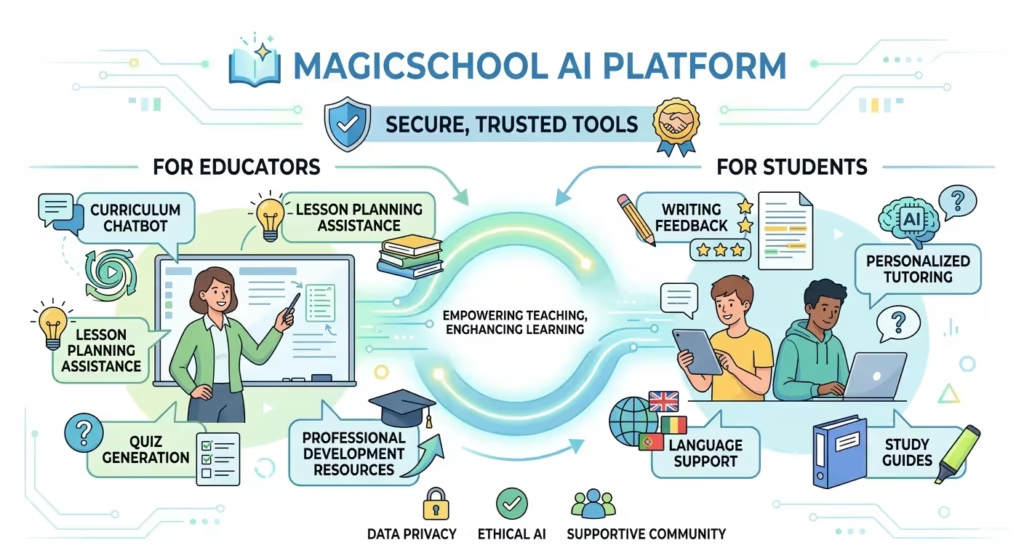
Magic School AI stands out because of its tools built specifically for classrooms. I spent time testing the platform and found eight features that help teachers work less while students learn more.
Text Leveler: Adjust Reading Complexity
The Text Leveler helps teachers adapt any text for different grade levels, making content available to every student. This tool proved to be a great way to get different instruction methods – you just paste text (through copy/paste or PDF), pick a grade level, and Magic School AI rewrites it to match your students’ reading abilities. You can create different versions of the same article. Students can pick their comfort level while reading interesting content.
Rubric Generator: Fast and Customizable
The Rubric Generator makes creating assessment criteria much easier. This tool creates well-laid-out rubrics in table format that spell out assessment criteria for students and teachers. You just pick a grade level, add assignment details (title, description, objective), choose points, and generate. The rubric makes grading fair and shows students what you expect. Best of all, you can customize it further – a simple prompt lets you remove criteria you don’t need (like creativity).
YouTube Video Questions: Auto-Generate Assessments
This tool turns educational videos into learning tools by creating questions from YouTube content, similar in spirit to dedicated AI quiz generators that create tests instantly. It makes multiple-choice, true/false, or free-response questions that line up with video content. The tool needs videos with closed captions and works through these steps:
- Pick grade level and number of questions
- Choose question format (multiple choice, free response)
- Add the YouTube video URL
- Hit generate
Teachers can quickly create pre-viewing guides, check understanding, or start discussions.
Sentence Starters: Support Student Writing
The Sentence Starter tool creates prompt beginnings for any topic. This framework helps students organize and share their thoughts. Students use these starters for reflective essays, peer feedback, or class discussions. This support helps them break through writer’s block and structure their ideas better.
AI-Resistant Assignments: Prevent Plagiarism
AI brings benefits, but students might misuse it. The AI-Resistant Assignments tool shows ways to change assignments so AI chatbots can’t complete them easily, and it pairs well with AI detector tools for teachers in 2025 when you need to investigate suspected AI-generated work. Enter your assignment prompt, and Magic School AI gives 2-3 creative options that focus on personal reflection, class discussion, media creation, or group work – tasks that AI doesn’t deal very well with.
Raina Chatbot: Your AI Teaching Assistant
Raina works like ChatGPT but knows more about teaching. This chatbot helps create assessment questions, translate content into different languages, summarize topics, and rephrase text.
Group Work Generator: Plan Collaborative Tasks
This tool makes planning group activities easier. Teachers choose grade level, group size (2-6 students), time (10-50 minutes), and topic or standard. You get detailed group work plans with goals, materials needed, clear instructions, timing suggestions, questions to ask, and extra activities—features that complement many of the best classroom management tools for teachers used to organize groups and keep students on task.
Output History: Save and Reuse Content
Magic School AI keeps all your created content in its Output History. Teachers can find past work, save their favorite items for later, and change old content instead of starting over – saving prep time.
Addressing Diverse Needs and Inclusivity
Magic School AI is thoughtfully designed to meet the diverse needs of today’s classrooms, making inclusivity a core part of its mission. The platform’s wide range of tools empowers teachers to support students of all backgrounds, learning styles, and abilities. For example, the Individualized Education Program (IEP) tool streamlines the creation of personalized learning plans, ensuring that every student receives the tailored support they deserve.
Integration with Google Docs and Google Classroom further enhances accessibility, allowing teachers and students to collaborate seamlessly and access resources from any device. Magic School AI’s commitment to inclusivity is also reflected in its support for educators who champion diversity, such as those proudly wearing “Black Teachers Are Magic” t-shirts to celebrate their identity and dedication. By providing adaptable tools and fostering a supportive environment, Magic School AI helps educators create classrooms where every student can thrive, regardless of their unique needs.
How to Use Magic School AI in the Classroom

Magic School AI is accessible to everyone – no technical expertise needed. More than 13,000 schools and districts across 160+ countries trust this platform for their classroom needs. Many educators are using AI tools like Magic School AI to manage routine tasks, allowing them to focus more on teaching. AI tools can also help educators handle busy work that is often required by administration.
Step-by-Step Setup Guide
Creating your Magic School AI account is simple. Visit the official website to complete the easy registration processThe platform features an easy-to-use design with built-in safeguards. These safeguards detect potential bias, ensure factual accuracy, and protect privacy—making it secure for educational use.
The platform offers complete training resources after setup. You’ll find certification courses, virtual training options, one-pagers, and video tutorialsTeachers report saving over 7 hours each week by using Magic School to simplify their work. The time spent learning the platform quickly pays off.
Prompting Tips for Better Results
Your prompts must be well-designed to get the best results from Magic School AI. Think about your specific needs before typing—whether you need a lesson plan, practice problems, or a creative activity
Make your requests as detailed as possible. Rather than asking for “a lesson plan,” try this: “Create a 45-minute lesson plan for 3rd-grade math on fractions, including an engaging opening activity, practice problems, and a formative assessment”
The results improve with experimentation. If you find the output too basic, adjust your request with specific additions like “Add a differentiated strategy for advanced learners”
Integrating with Google Classroom and Microsoft
Magic School AI easily connects with popular learning management systems. The platform works with Canvas, Schoology, and offers 1-click exports to Google and Microsoft products. You can move content between platforms without hassle.
Google Classroom users benefit from embedded rooms and single sign-on (SSO). No extra logins or lost tabs to worry aboutTeachers and students can use AI-powered tools right within their existing workflows
Best Practices for Safe AI Use
AI handles sensitive educational data, so these safety guidelines are crucial:
- Keep student names and personal information out of prompts
- Check AI outputs for bias, accuracy, and appropriateness
- Use the 80-20 approach: AI helps with initial work (80%), but you add final touches and review the last 20%
- Know AI’s limits—it can’t access current internet data and its training stops at a specific date
The numbers speak for themselves – 88% of teachers say Magic School AI helps meet diverse student needs. The platform supports educators without replacing them. You stay in control while saving time for what truly matters: connecting with your students
Magic School AI Pricing: Free vs Plus vs Enterprise
Magic School AI’s pricing structure helps you pick a plan that lines up with your teaching needs and budget. The platform gives you three different tiers that work for individual teachers and school districts alike.
Free Plan: What’s Included
Magic School AI stands by its promise of a “free forever” plan. This no-cost option lets you access:
- All 80+ standards-based AI tools for educators
- Raina chatbot with basic functions (mainly the translate feature)
- Student-safe AI tools that build AI literacy skills
- Immediate engagement data for student support
- AI image generation powered by Adobe
Your usage limits reset monthly on the free plan, and you’ll get warnings as you reach your limitThe system keeps only your last 5 generations in the output history
Plus Plan: $8.33/month Features
The Plus subscription gives you unlimited access and premium features. You can choose between:
- Annual subscription: $8.33/month ($99.96/year) – 36% less than monthly billing
- Monthly subscription: $12.99/month
Plus members get everything from the free plan with unlimited AI generations, student rooms, output history, and 1-click exports to popular LMS platforms like Google and MicrosoftPlus users also get first access to new features and MagicSchool Labs, where they can try upcoming tools
Enterprise Plan: School-Wide Benefits
The Enterprise plan’s pricing depends on student count, usually $3-$4 per student. This plan includes:
- School’s custom settings and AI tools
- RAG technology that creates custom tools from your organization’s documents
- Advanced data dashboards and analytics
- Professional development resources and certification courses
- Your dedicated Customer Success Manager
Is the Paid Plan Worth It?
The plan’s value depends on how you use it. Occasional users will find the free plan quite useful. Regular users should consider the Plus plan – it costs less than half of Microsoft Copilot ($25/month) and ChatGPT Plus ($20/month)
Schools looking for classroom-wide implementation will get the most value from Enterprise plans. These plans combine unlimited access with professional development support and custom options
Each new account comes with a 30-day Plus plan trial without needing a credit card. This lets you test all premium features before you decide
Pros and Cons of Magic School AI for Teachers
I tested Magic School AI thoroughly in my classroom and want to share a balanced view of what works and what doesn’t for teachers who want to try this tool.
Time-Saving Benefits
Magic School AI makes a real difference in reducing workload. Teachers report they save 7-10 hours every week, and 94% of users say the platform saves them valuable time. The platform streamlines processes in several ways, much like other AI teaching platforms that centralize grading and content creation. Teachers now spend just minutes on lesson plans that used to take hours, and AI-powered test generators that build quizzes in minutes contribute to these time savings. Grading time has dropped dramatically – tasks that once took multiple hours now wrap up in 30 minutes
Learning Curve and Limitations
Magic School AI proves valuable but comes with some challenges. Users need time to navigate its many functionsThe AI knowledge cutoff date of 2021 means some content might be outdated or incorrect. More tutorial videos would help teachers get the most from this tool
Privacy and Student Safety
Magic School AI shines when it comes to student data protection. Common Sense Media gives it a 93% privacy ratingThe platform meets all FERPA, COPPA, and GDPR requirements and holds SOC 2 certificationBuilt-in safeguards catch potential bias and protect student personal information
Comparison with Other AI Tools
Magic School AI costs nowhere near as much as Microsoft Copilot ($25/month) or ChatGPT Plus ($20/month)The platform stands out from general AI tools with education-focused features like standards-aligned rubrics and classroom-safe content filters
Magic School AI excels as a powerful educational tool built specifically for teachers. My tests of the platform’s 60+ specialized tools showed they consistently help with time-consuming tasks, similar to how Eduaide AI streamlines lesson planning and assessment creation. The text leveler, rubric generator, and YouTube question creator are great for distinguishing student needs and assessment. The sentence starters and AI-resistant assignment features help with student support and maintain academic integrity.
The platform offers most important advantages for educators. Teachers save between 7-10 hours each week that they can spend on meaningful student interactions. The accessible interface makes AI technology available to even tech-hesitant educators. A privacy rating of 93% gives peace of mind to anyone worried about student data protection.
Magic School AI has a few limitations you should think over. The platform might feel overwhelming at first because it has so many functions. The AI’s knowledge cutoff date means teachers need to check content accuracy, especially when subjects change faster.
The platform gives excellent value compared to general-purpose AI tools. The free plan works well for occasional users. The Plus subscription costs $8.33/month (annually) and gives unlimited access to all features at a reasonable price. School administrators find the Enterprise option appealing, especially when they have plans for school-wide implementation.
My verdict? Magic School AI offers a well-designed solution that tackles real classroom challenges. It balances innovation with practicality and provides tools that reduce administrative work without trying to replace teachers. Magic School AI deserves your attention if you want to save time on planning and grading or need better ways to customize instruction.
Final Thoughts and Future Developments
Magic School AI stands at the forefront of educational technology, offering a comprehensive suite of AI tools that empower teachers, students, and school districts worldwide. Its dedication to responsible AI, inclusivity, and ongoing innovation ensures that the platform remains a valuable resource for lesson planning, student engagement, and classroom support. As the needs of educators and learners continue to evolve, Magic School AI is poised to introduce even more powerful features—like enhanced rubric generators and adaptive lesson planning tools—that will further transform the educational landscape.
With a strong foundation built on trust, transparency, and educator feedback, Magic School AI is committed to making a lasting difference in how we teach and learn. Whether you’re a classroom teacher, school leader, or district administrator, Magic School AI offers the support and flexibility needed to meet the challenges of modern education. As more educators worldwide adopt these tools, the future of teaching looks brighter, more efficient, and more inclusive than ever before.
✨ Notie AI – The AI that corrects your papers

