

AI prompts for teachers could revolutionize your classroom experience. Your teaching toolkit might be missing one of education’s most powerful new tools.
The best AI prompts for teachers target specific classroom challenges. Chat GPT prompts can reshape your approach to everyday tasks – from generating study guides to creating rubrics.
Prompt to Create a Full Lesson Plan

Image Source: Magic School AI
AI helps educators save valuable time as they create full lesson plans without compromising on quality instruction. Here’s how you can craft the perfect prompt.
Prompt purpose
AI-powered lesson plan generators revolutionize simple instructions into detailed teaching resources.
Prompt example
You are an experienced educator with strong knowledge of [subject area] and pedagogical principles. I need help creating an engaging lesson for my [grade level] students on [specific topic/standard]. The lesson should include:

1. Clear learning objectives lined up with [specific standards]
2. An engaging hook/warm-up activity
3. Content introduction with ground connections
4. Guided practice with example problems
5. Independent/collaborative practice activities
6. Assessment strategies
7. Key vocabulary with definitions
8. [Differentiation options for diverse learners](https://www.notieai.com/ai-special-education-guide-teachers-2025/)
Best use case
Tips for customization
Your AI-generated lesson plans will work better if you:
Start with specific learning outcomes and exact standard codes Add class context (reading levels, IEP needs) without identifying information Specify class length and available resources Ask for variations that match different readiness levels Give feedback on original drafts to refine them
Note that AI gives you a starting point.
Prompt to Generate a Study Guide

Image Source: NoteGPT
Study guides are the foundations of good learning. AI tools now give teachers a great way to generate custom study materials quickly.
Prompt purpose
Prompt example
You are an expert educator specializing in [subject area]. Create a detailed study guide for my [grade level] students on [specific topic/concept]. Include:

1. A concise summary of key concepts
2. Essential vocabulary with simple definitions
3. Visual organization (tables/concept maps)
4. 5-7 practice questions with answers
5. Structure this for [visual/auditory/reading] learning styles
6. Make this appropriate for [beginner/intermediate/advanced] level
Best use case
Tips for customization
Your AI study guides will work better if you:
List exact learning goals or upload existing materials (notes, slides, PDFs) Ask for specific formats based on subject needs (flashcards for vocabulary, diagrams for science) Set difficulty levels from beginner to expert Match study timeframes—from quick 30-minute reviews to week-long preparations
Students learn differently.
Prompt to Write Multiple Choice Questions

Image Source: Nearpod
Multiple choice questions are the life-blood of classroom assessment. Creating good ones takes skill and time. AI tools make this job much easier now.
Prompt purpose
AI-powered MCQ generators change content into quality multiple choice questions. They create correct answers and believable wrong options. Teachers can use different formats – standard MCQs, true/false, fill-in-the-blanks, and questions that line up with Bloom’s Taxonomy levels. The tools help create detailed assessments that test various thinking skills beyond just facts.
Prompt example
As an expert assessment designer, create 10 multiple-choice questions about [specific topic] for [grade level] students. For each question:

1. Write a clear, concise stem avoiding negative phrasing
2. Provide four answer options with one correct answer
3. Ensure distractors are plausible but clearly incorrect
4. Include a brief explanation for the correct answer
5. Vary the difficulty level (3 easy, 4 medium, 3 challenging)
6. Line up questions with [specific learning objectives]
Best use case
This prompt works great for formative assessments, exam prep, and quick knowledge checks. AI-generated MCQs save precious time without losing quality.
Tips for customization
You can make your AI-generated questions better by:
- Stating exact question types (MCQ, true/false, etc.) and how many you need
- Asking for specific difficulty levels (easy, medium, hard)
- Including image-based questions where they fit
- Letting AI know if you need explanations for right answers
- Getting questions in formats ready for your learning management system
Take time to check the generated questions. Make sure they match your teaching goals before using them with students.
Prompt to Design a Rubric

Image Source: Kangaroos AI
Creating effective rubrics is one of the most time-consuming tasks educators face. All the same, AI prompts can help teachers simplify this process and maintain high-quality assessment standards.
Prompt purpose
Teachers can use AI-powered rubric generators to craft detailed evaluation criteria that match learning objectives. These tools can identify both explicit and implicit criteria in assignment prompts to ensure detailed assessment coverage. AI quickly drafts well-laid-out rubrics, which saves valuable planning time and helps teachers maintain clear expectations for students.
Prompt example
As an experienced educator, create a detailed rubric for [assignment type] in my [grade level] [subject] class. Include:

1. Assignment purpose: [brief description]
2. Learning objectives: [list specific objectives]
3. Format: [analytical/holistic/single-point]
4. Scoring scale: [e.g., 1-4, Excellent-Needs Improvement]
5. Criteria: [list 3-5 key assessment areas]
6. Use student-friendly language with clear, actionable descriptors
Best use case
This prompt delivers excellent results for rubrics that need structured feedback options. Complex assignments that require multiple evaluation criteria or new assignment types work best with this approach. Teachers commonly use it to standardize assessment across multiple class sections and provide clear guidelines for peer evaluation activities.
Tips for customization
You can improve your AI-generated rubrics by:
- Specifying the exact rubric type (holistic, analytical/descriptive, or single-point)
- Asking for student-friendly language that suits your grade level
- Checking outputs for clarity, fairness, and objective alignment
- Adjusting point distribution to highlight priority skills
- Testing the rubric with sample work before finalizing
Note that AI-generated rubrics serve as starting points that need your professional touch and customization.
Prompt to Create a Classroom Game

Image Source: Rosebud AI
Educational games turn standard classroom reviews into fun learning experiences. Teachers can now create custom educational games easily with AI tools.
Prompt purpose
Teachers use AI-powered game generators to develop interactive classroom activities. These tools combine curriculum content with puzzle-based learning that students enjoy. The games come in many formats—from escape rooms to Jeopardy-style reviews. Students reinforce key concepts while staying motivated. The games go beyond traditional reviews and help students think critically, work together, and participate actively.
Prompt example
As a game design expert, create a [game type: Escape Room/Jeopardy/Battleship/Bingo] for my [grade level] class about [specific topic]. Include:

1. Clear learning objectives arranged with [standard]
2. Game materials needed
3. Detailed setup instructions
4. 10-15 curriculum-aligned questions/challenges
5. Answer key
6. Time requirements and group size recommendations
Best use case
These games shine during review sessions and help introduce complex topics through interactive involvement. The original design focuses on content reinforcement, but teachers can use them for formative assessment or building classroom community.
Tips for customization
- Connect different subjects to strengthen overall learning
- Include student’s interests to boost engagement
- Add surprises to keep excitement high
- Modify difficulty to match different student abilities
Prompt to Write a Newsletter for Parents

Image Source: We Are Teachers
Teachers often struggle to create regular newsletters that keep parents in the loop. AI tools now make this once-tedious task simple and quick.
Prompt purpose
Teachers can now make use of AI-powered newsletter generators to craft professional updates for parents that build stronger connections between school and home. These tools create polished newsletters automatically when teachers input basic information about classroom activities and announcements.
Prompt example
As an experienced educator, create a [weekly/monthly] newsletter for parents of my [grade level] students. Include:

1. Class name: [name]
2. Recent activities: [what we did last week]
3. Upcoming lessons: [what we're doing next week]
4. Important reminders: [dates, supplies needed]
5. Family engagement suggestions: [activities parents can do at home]
6. Student recognition: [achievements to highlight]

Use a professional yet warm tone with clear, concise language.
Best use case
This prompt works great for regular parent updates, especially during hectic school periods.
Tips for customization
You can enhance your prompt results by:
- Adding details about your audience (multilingual families, grade-specific concerns)
- Including your school’s branding elements or communication style
- Suggesting multimedia content (photos, videos)
- Choosing specific formats (email-ready or print layouts)
Prompt to Generate Vocabulary Flashcards

Image Source: Canva
Learning vocabulary is the foundation of mastering any language. AI tools now make creating flashcards a simple process.
Prompt purpose
AI-powered flashcard generators revolutionize text passages into sets of vocabulary that are sorted by complexity levels.
Prompt example
Act as an educational vocabulary specialist. Generate 15 flashcards from this [text/chapter/passage]:[paste content]
For each flashcard: 1. Identify key vocabulary words with grade-appropriate definitions 2. Categorize into Tier 1 (basic), Tier 2 (academic), or Tier 3 (subject-specific) vocabulary 3. Include 2 example sentences showing proper usage 4. Add 1 image description that visually represents the word 5. Format for easy import into [Quizlet/Anki/other platform]
Best use case
This prompt works great to prepare vocabulary for new units and helps English Language Learners.
Tips for customization
- Choose the exact number of cards you need
- Add multilingual translations for diverse classrooms
- Set complexity levels based on student’s proficiency
- Add audio components to practice pronunciation
Prompt to Create a Reading Passage

Image Source: www.projectread.ai
Students engage much more with customized reading passages. Finding the right text can be challenging, but AI tools have made this process much easier.
Prompt purpose
AI reading passage generators create tailored texts that match specific grade levels, vocabulary requirements, and curriculum objectives.
Prompt example
Create a [grade level] reading passage about [specific topic]. The passage should:
1. Be approximately [word count] words long
2. Include vocabulary terms: [list key terms]
3. Use [simple/complex] sentence structure
4. Include [specific curriculum connections]
5. Be written in [tone/style]
Best use case
This prompt works best to differentiate instruction in mixed-ability classrooms.
Tips for customization
- Specify reading levels precisely (Lexile, grade level, or “simplified”/”advanced”)
- Request passages that incorporate interdisciplinary connections
- Generate multiple versions with similar content but varying complexity
Iterate by asking AI to “make it funnier” or “explain it to [specific audience]”
Prompt to Translate Text for ELL Students

Image Source: Wordvice AI
AI translation prompts make it much easier to break language barriers for English Language Learners. Teachers can provide individual-specific support and help ELL students access curriculum content whatever their language proficiency level.
Prompt purpose
AI translation tools help ELL students through individual-specific, interactive learning experiences.
Prompt example
As a language education specialist, translate this [text/document/assignment] from [source language] to [target language] for my ELL students. Please:

1. Maintain academic vocabulary while simplifying complex syntax
2. Preserve key terminology in both languages
3. Include pronunciation guides for challenging words
4. Create a side-by-side format for language comparison
5. Add brief cultural context notes where relevant
Best use case
This prompt helps make academic content available while supporting language acquisition.
Tips for customization
The best results come from:
Testing on a small scale before full implementation Requesting specific document formats (TMX, XLIFF, TXT, DOCX, XLSX) Specifying sentence arrangement across documents Making use of monolingual data alongside parallel training data Quick updates work best with translation—never share sensitive information
Prompt to Simulate a Historical Interview

Image Source: Rolling Stone
Historical interviews take students on a journey through time and create meaningful connections with the past. AI prompts make this teaching method available to every classroom.
Prompt purpose
AI-powered historical interview simulators let students have direct conversations with historical figures. These tools create responses based on historical texts, speeches, and documented beliefs that help students learn about history through personal interactions. Right now, platforms like Hello History give access to more than 400 historical figures in categories like “Middle Ages” or “Founding Fathers of USA.”
Prompt example
You will role-play as [historical figure] from [time period]. Respond to questions based on documented speeches, writings, and beliefs. Include:

1. Accurate historical context and vocabulary
2. First-person perspective consistent with the figure's known views
3. References to key events and relationships from their life
4. Keep responses under 120 words for readability
5. Suggest 3 areas for further research after our conversation
Best use case
This prompt works best when students research historical figures to prepare for “wax museum” assignments where they become these characters. Teachers say their students spend about two hours each day talking with historical character simulations.
Tips for customization
The best results come from:
- Using interactive timelines with the simulations to provide detailed historical context
- Asking questions about which historical views get represented
- Checking AI-generated content against primary sources
Prompt to Create a Science Experiment
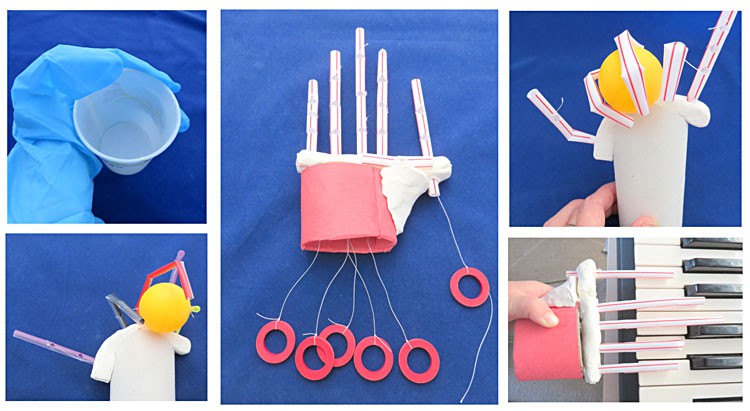
Image Source: Science Buddies
Science experiments make abstract concepts come alive, but creating effective lab activities can be tough without AI help. Teachers can now use Chat GPT prompts to make this process quick and simple.
Prompt purpose
AI experiment generators help teachers create custom lab activities that match their curriculum goals.
Prompt example
As a science education specialist, design a grade-appropriate experiment about [specific topic] for my [grade level] students. Include:
1. Required materials (common classroom/household items)
2. Step-by-step procedure
3. Expected observations/results
4. 3-5 discussion questions
5. Safety precautions
6. Connections to [specific curriculum standard]
Best use case
Tips for customization
- Pick your experiment type (observation, controlled experiment)
- Ask for safe activities using household items for remote learning
Link to other subjects to strengthen learning connections Add student interests to boost their involvement
Prompt to Generate a Math Word Problem

Image Source: Writecream
Math word problems connect abstract concepts to ground situations. Creating relevant examples takes considerable time. AI tools now change this process by generating individual-specific problems instantly.
Prompt purpose
AI math problem generators create individual-specific word problems tailored to specific grade levels, topics, and student interests.
Prompt example
Create 5 math word problems about [specific topic: fractions/equations/geometry] for [grade level] students that:

1. Incorporate [real-world scenarios](https://www.notieai.com/essential-ai-tools-math-teachers-2025-guide/) related to [student interest: sports/cooking/gaming]
2. Range in difficulty from [basic/intermediate/advanced]
3. Include step-by-step solutions
4. Connect to standard [specific math standard/objective]
5. Use culturally relevant contexts for my diverse classroom
Best use case
Tips for customization
You can boost your math problems by:
- Setting exact difficulty parameters
- Including students’ names or interests
- Adding visual elements that support different learning styles
- Creating variations that show multiple solution approaches
Prompt to Write a Persuasive Essay Sample

Image Source: Canva
Students often face challenges with persuasive writing, especially when they need to build arguments and choose evidence. Teachers can now use AI tools as a great way to get resources that model persuasive techniques effectively.
Prompt purpose
Students can learn about argument structure and beat writer’s block with AI persuasive essay generators. These tools create sample essays quickly that show thesis statements, supporting evidence, and counterarguments. AI-generated essays are a rich source of mentor texts. Students can analyze these texts with writing checklists or rubrics to spot effective persuasive techniques.
Prompt example
Create a persuasive essay sample for [grade level] students on the topic "[controversial topic]" that:

1. Opens with an engaging hook and clear thesis statement
2. Provides 3 main supporting arguments with evidence
3. Acknowledges and refutes 1-2 counterarguments
4. Uses appropriate transition phrases and persuasive language
5. Concludes by restating the thesis and providing a call to action
Best use case
Teaching persuasive writing structure through comparison works best with this prompt. Students learn more when they analyze AI-generated essays next to sophisticated examples. They identify differences and discuss what makes arguments effective. This approach pushes students toward critical analysis instead of just copying AI output.
Tips for customization
Ask for essays that show balanced arguments with appropriate qualifiers. Students should add their own examples and viewpoints to AI-generated outlines. The AI essays should serve as starting points for students’ work rather than final products.
Prompt to Create a Mind Map

Image Source: Andrew Maynard
Visual thinking makes concept understanding easier. Creating detailed mind maps takes time and effort. Modern AI tools now generate these visual frameworks instantly to help teachers organize complex information.
Prompt purpose
AI mind map generators turn text input into structured visual diagrams that organize information hierarchically.
Prompt example
As a visual learning specialist, create a detailed mind map about [specific topic] for my [grade level] students. Include:

1. Central concept clearly defined
2. 3-5 main branches representing key subtopics
3. 2-3 levels of hierarchy for each branch
4. Brief explanations at each node (under 10 words)
5. Color-coding to group related concepts
6. Format suitable for [digital display/printing]
Best use case
This prompt excels at organizing complex academic material into digestible visual formats.
Tips for customization
The quickest way to get optimal results:
- Set exact branch depth and complexity based on grade level
Ask for subject-specific formatting (mathematical equations for STEM topics) Add audio notes for verbal explanations Pick export format (PDF, PNG, SVG) to share easily
Note that AI-generated mind maps work best as starting points. Students should expand and personalize them to learn more deeply.
Prompt to Provide Feedback on Student Writing

Image Source: Edutopia
Teachers often feel overwhelmed when they need to give detailed feedback on student writing. Time constraints make this task challenging. AI tools now provide innovative ways to handle this challenge.
Prompt purpose
AI writing feedback tools analyze student essays and give well-laid-out, applicable information.
Prompt example
Review this student writing sample about [topic] for my [grade level] class. Provide feedback that:

1. Identifies 2-3 specific strengths in the writing
2. Suggests 2-3 areas for improvement
3. Offers specific, actionable revision strategies
4. Aligns with these rubric criteria: [list criteria]
5. Uses encouraging, student-friendly language
Best use case
Teachers with heavy class loads find this prompt helpful to quickly give original feedback.
Tips for customization
Adding specific rubrics improves feedback quality Feedback works better when structured as “strengths, growth areas, and wonderings” Tools become more effective with assignment-specific criteria - AI feedback combined with peer review creates a more detailed improvement process
Prompt to Create a Classroom Seating Chart

Image Source: seatingchartmaker.app
Classroom seating arrangements need careful planning with multiple factors in mind. Modern AI tools make this task easier by using informed approaches to organize classrooms.
Prompt purpose
AI-powered seating chart generators create strategic arrangements based on student characteristics, priorities, and behavioral patterns.
Prompt example
As a classroom management specialist, create a seating chart for my [grade level] class with [number] students. Think about:

1. Classroom dimensions: [length x width]
2. Furniture available: [desks/tables/special equipment]
3. Student needs: [list any IEP accommodations/visual/hearing needs]
4. Behavioral considerations: [students who work well/poorly together]
5. Learning objectives: [collaborative/independent/discussion-based]
Best use case
Teachers managing classrooms with different learning needs will find this prompt particularly useful.
Tips for customization
Better results come from:
- Adding specific classroom dimensions and furniture layouts
Tracking student priorities through QR code scanning systems Using color-coding for students with special needs Making quick adjustments with drag-and-drop features
Prompt to Generate a Behavior Management Plan

Image Source: Educators Technology
Classroom behavior management tests even seasoned teachers. Student intervention plans take hours to create. AI tools make this work easier through smart prompts.
Prompt purpose
AI behavior management tools create custom strategies for classroom problems from constant disruption to student anxiety. These tools offer frameworks that line up with 10-year old approaches like PBIS or restorative practices. Teachers get practical suggestions that fit their classroom setup, grade level, and student requirements.
Prompt example
As an expert educator with exceptional classroom management skills, create a comprehensive plan for addressing [specific behavior issue] in my [grade level] [subject] class during [specific time/activity]. Include:

1. Three targeted strategies aligned with [PBIS/restorative practices/preferred framework]
2. Implementation steps for each strategy
3. Self-regulation techniques appropriate for this age group
4. Documentation approach for tracking progress
5. Next steps if the behavior persists
Best use case
This prompt shines when teachers need structured plans for ongoing classroom issues. These plans help students fix relationships and develop new skills instead of just facing consequences.
Tips for customization
Your behavior management plans work better when you:
- Keep student details private
- Note when problems happen most (transitions, after lunch)
- Ask for questions students can answer on their own
- Add templates for parent messages to keep communication consistent
Prompt to Recommend Books by Topic

Image Source: Medium
Educators face an ongoing challenge to match the right books with their students’ varied interests. AI book recommendation tools now offer individual-specific solutions that revolutionize reading involvement.
Prompt purpose
AI book recommendation systems analyze reading priorities to suggest titles that strike a chord with individual students.
Prompt example
As a literary specialist, create a personalized reading list of 5-7 books for my [grade level] students interested in [specific topic/theme]. For each recommendation:

1. Include title, author, and brief non-spoiler summary
2. Note reading level and appropriate age range
3. Explain why this book connects to the stated interest
4. Suggest one discussion question for each book
5. Include diverse authors and views
Best use case
This prompt shows its true value when helping reluctant readers find books that line up with their personal interests. Beyond supporting individual students, it creates themed classroom libraries or suggests summer reading options effectively.
Tips for customization
The best results come from:
- Including previous books students enjoyed or disliked
- Requesting recommendations with specific curriculum connections
- Asking for books that represent your classroom’s demographics
Using platforms like Bookfinity that offer “Like and Lose” features to refine recommendations
Comparison Table
| Prompt Type | Main Goal | Best Use Case | Key Features | Tips for Customization |
|---|---|---|---|---|
| Create Lesson Plan | Turn simple instructions into complete teaching resources | New teachers learning their craft or experienced teachers who want to streamline processes | Learning goals, warm-up activities, guided practice, ways to assess | Start with clear outcomes, add class details, mention class duration |
| Generate Study Guide | Turn raw content into well-laid-out learning materials | Content-heavy classes such as AP/IB courses | Key terms, definitions, tables, flashcards, concept maps | List exact goals, ask for specific formats, adjust difficulty |
| Write Multiple Choice Questions | Build high-quality MCQs with correct answers and realistic options | Quick assessments, exam prep | Different question types, matches Bloom’s Taxonomy, explains right answers | Name question types, set difficulty, ask for picture questions |
| Design Rubric | Build detailed grading criteria that line up with learning goals | Complex work needing multiple evaluation points | Structured feedback choices, standard grading criteria | Name rubric style, use clear language, test with example work |
| Create Classroom Game | Build fun classroom activities using course content | Review sessions, teaching tough topics | Various game styles, curriculum-based questions, clear setup steps | Ask for subject connections, include student interests, set challenge level |
| Write Parent Newsletter | Build professional updates for parents | Regular updates during busy times | Class news, upcoming lessons, reminders, family participation ideas | Add audience details, include branding, suggest media elements |
| Generate Vocabulary Flashcards | Turn reading passages into organized word sets | New unit prep, helping ELL students | Grouped vocabulary levels, example sentences, visual elements | Set card count, ask for translations, change complexity |
| Create Reading Passage | Build custom texts that match specific needs | Teaching mixed-ability classrooms | Flexible complexity, fits curriculum, includes key vocabulary | Set reading level, ask for subject connections, make multiple versions |
| Translate for ELL | Give personal language help | Making course content available for new students | Pronunciation guides, side-by-side text, cultural notes | Begin with small tests, list document needs, think about cultural context |
| Simulate Historical Interview | Build immersive learning experiences | Research work like “wax museum” projects | First-person view, historical facts, suggested research topics | Add timelines, check primary sources, think about ethics |
| Create Science Experiment | Build custom lab work | Hands-on science learning | Material lists, steps, safety rules, assessment choices | Name experiment type, ask for safe activities, add subject connections |
| Generate Math Word Problems | Build personalized problems with real-life context | Teaching different skill levels | Various difficulties, real-life scenarios, step-by-step answers | Set difficulty limits, add student interests, ask for visuals |
| Create Mind Map | Turn text into clear visual diagrams | Organizing complex course material | Organized hierarchy, color-coding, brief notes | Set branch levels, ask for subject formatting, think about sharing options |
| Provide Writing Feedback | Look at student essays with structured comments | Large classes needing quick first feedback | Rubric-based review, specific tips for improvement | Include specific rubrics, match to assignments, add peer review |
| Create Seating Chart | Build smart arrangements based on student needs | Managing diverse classes with varied needs | Multiple setup choices, considers student needs | Add room size, note student choices, keep manual options |
| Generate Behavior Plan | Build personal strategies for specific issues | Fixing common classroom management problems | Focused strategies, action steps, progress checks | Skip names, add time patterns, include parent updates |
| Recommend Books | Suggest books based on reading choices | Helping reluctant readers find books they’ll enjoy | Personal suggestions, reading levels, discussion topics | List past choices, connect to curriculum, consider student background |
Conclusion
These AI prompts will reshape the scene of your classroom and save you valuable time. This piece shows how ChatGPT and other AI tools help with everything from lesson planning and assessment creation to parent communication and behavior management. The power of these 50+ prompts comes from their flexibility. You’ll find practical ways to use them whether you teach kindergarten or high school, math or language arts.
Teachers who start small with one or two prompts build confidence faster. You could start with a simple study guide generator before moving to complex tasks like historical interviews or customized science experiments. Each success will motivate you to try something new.
AI works as your assistant, not your replacement. These prompts give you excellent starting points, but your professional judgment stays crucial to adapt AI outputs for your classroom. Your students need your human connection, creativity, and understanding—qualities no AI can copy.
Innovative technology in education keeps evolving faster. Today’s groundbreaking features will become tomorrow’s standard practice. You should try these prompts with an experimental mindset. Test different variations, track what works best for your students, and share winning strategies with colleagues.
Technology and education meet at an exciting point. AI prompts let us spend less time on repetitive tasks and more on what counts—meaningful interactions with our students. Your AI classroom experience starts here—which prompt will you try first?
✨ Notie AI – The AI that corrects your papers

