

Teachers like us always struggle with time constraints. We all share that familiar feeling – the wish for extra hours to dedicate to what matters most: our students.
AI tools now appear in classrooms everywhere – not to replace us, but as valuable assistants that make our daily tasks easier. The number of teachers who add new software to their routines grows each day. The quest to find the best ai tools for teachers that save time instead of creating extra work is a vital part of modern teaching.
The best ai teaching tools handle repetitive work such as creating lesson outlines, grading quizzes and writing parent communications. These tools give us back valuable hours to spend on teaching and supporting students by automating the time-consuming parts of planning and assessment.
Our team tested dozens of platforms and found 11 ai teaching tools that save teachers more than 3 hours each week. These tools help you create personalized lessons and let you concentrate on deeper learning outcomes.
MagicSchool.ai

Image Source: Magic School AI
MagicSchool.ai leads the pack as an AI platform that’s accessible to more people in education. You’ll find it in almost every U.S. school district and 160 countries around the world. This complete tool helps ai teachers get back precious time and curb burnout.
MagicSchool.ai key features
MagicSchool.ai comes with 60+ AI tools that reshape the scene of everyday teaching tasks. Here are some of its most valuable features:
Text Leveler: Makes any text available at different grade levels so learning materials work for everyone
Text Translator: Changes content into multiple languages to help ELL students and multilingual families
AI-Resistant Assignments: Suggests creative ways to modify assignments that AI can’t easily complete
Custom Chatbots: Sets up specialized tutoring assistants to support students
The platform has Raina, an AI instructional coach that helps create lesson plans, assessments, and IEPs. On top of that, it offers MagicSchool for Students with a similar interface to teachers, letting students safely use AI tools under supervision.
MagicSchool.ai pricing
MagicSchool.ai gives you three pricing options:
Free: Always free access to basic teacher and student tools, with 80+ teacher tools and 50+ student tools
Plus: $8.33/month (billed annually) or $12.99 monthly with unlimited generations, complete output history, and advanced features
Enterprise: Custom pricing for districts that includes SSO integration, curriculum alignment, tool management controls, and dedicated support
MagicSchool.ai best use cases
MagicSchool.ai proves its worth as a complete assistant for ai teachers in a variety of situations. Teachers save 7-10 hours every week when they use the platform to plan lessons, tailor instruction, and create assessments.
Aurora Public Schools showed the platform’s strength in supporting English Language Learners. Their students’ literacy grade level expectations improved by 28% after they started using it.
Special education teachers rely on MagicSchool.ai to craft personalized IEPs, suggest behavior interventions, and adjust instruction. The platform works like a co-pilot for K-12 teachers. It helps them create materials that line up with standards while they focus on connecting with students.
Diffit

Image Source: Diffit
Diffit makes adapting educational content simple with its AI-powered capabilities. This tool changes how teachers modify classroom materials. Diffit stands out from other education platforms by focusing on making classroom materials available to every student through smart content adaptation.
Diffit key features
Diffit helps teachers customize instructional materials for their diverse classrooms:
Reading-level adaptation: You can adjust any text, article, PDF, or YouTube video transcript to different reading levels quickly (from 2nd through 11th grade+)
Resource generation: The system creates supplementary materials automatically including summaries, vocabulary lists, multiple-choice questions, and open-ended prompts
Standards alignment: Your content aligns with educational standards and specified DOK levels
Credible content: Every piece of generated content uses real, cited sources
Multiple export options: You can send materials directly to Google Docs, Slides, Forms, Classroom, or Microsoft 365
Teachers can modify existing materials or create new content from scratch on any topic. This makes differentiation practical whatever your time constraints.
Diffit pricing
You can choose between free and premium access:
Free version: You get 2,500-word limited outputs, citations, key vocabulary, reading questions, standards alignment, PDF export capability, and resource saving
Premium individual: For $14.99/month you receive increased 10,000-word limit and additional export features
School license: Annual subscription rates depend on student enrollment, costing about $4.00 per student or less for schoolwide access
Diffit best use cases
Teachers who use Diffit report success in several educational settings:
Mixed-ability classrooms: Teachers create multiple versions of lessons at different reading levels
Special education: Complex material becomes simpler while staying aligned with curriculum
ELL/ESL support: Content adapts for language learners with appropriate vocabulary framework
Time-saving: 96% of teachers say Diffit saves them valuable time
Student accessibility: 93% report better student engagement
Instructional improvement: 86% feel they become better educators
Diffit also follows strict privacy standards and doesn’t collect student data. This makes it ideal for schools that prioritize data security.
Curipod

Image Source: Teachnet.ie
Curipod makes interactive lessons easy with its AI-powered platform that gets students more involved. We’ve found this tool valuable as AI teachers because it helps create activities that encourage students to look up from their screens and talk with each other.
Curipod key features
Curipod stands out with these powerful capabilities that make it one of the best AI teacher tools:
AI-powered lesson generation: Create interactive lessons on any topic in just 30 seconds, complete with slides and activities
Up-to-the-minute AI feedback: Students get specific, applicable information while learning stays fresh
Interactive activity types: The platform has polls, word clouds, open-ended questions, drawings, and AI feedback options
Teacher-paced instruction: Research-backed instructional practices shape these lessons
Standards alignment: Content matches national and state standards
Moderation controls: Teachers can review student submissions before showing them to the class
Curipod helps ELL students with its translation feature that supports multiple languages.
Curipod pricing
Curipod keeps pricing simple:
Free version: The platform has all core features, unlimited participants, and 5 private interactive presentations
Premium: $90/year or $9/month with unlimited Curipod presentations
School and district licenses: Custom rates for institution-wide use
Curipod best use cases
Teachers have found these excellent ways to use this AI teaching tool:
Better engagement and behavior: Student participation and focus improve during lessons
Better writing quality: AI feedback builds student confidence and improves answer quality
ELL student support: Translation features make content available to English language learners
Better collaboration: Activities promote student interaction and discussion
Easy differentiation: Teachers meet diverse student needs without isolation
Many teachers now build most of their lessons with Curipod. They save time and see better classroom dynamics.
Gradescope

Image Source: Dang.ai
Grading takes up most of a teacher’s time. Gradescope changes how AI teachers grade their work. This AI-powered platform makes grading paper-based, digital, and code assignments quick and easy.
Gradescope key features
Gradescope’s powerful tools make it unique among AI teaching platforms:
AI-assisted grading: Groups similar answers together. Some questions get grouped automatically
Dynamic rubrics: You can create and change rubrics after starting to grade. Changes apply to work you’ve already graded
Answer grouping: Grade hundreds of student responses with a few clicks, even for open-ended questions
Detailed analytics: Shows statistics for questions and rubrics to spot gaps in student learning
Flexible assignment types: Works with assignments of any length like problem sets and projects. Also handles fixed formats such as worksheets, quizzes, and bubble sheets
Regrade requests: Students can ask for regrades online, which saves office hours
Teachers cut their grading time by more than half. What used to take 2-3 hours now takes just 15 minutes.
Gradescope pricing
Gradescope’s pricing plans fit different needs:
Basic: $1 per student per course – has assignment statistics, regrade requests, grade export, and simple email support
Team: $3 per student – adds shared grading and unlimited course staff
Solo: $3 per student – has AI-powered grading, code autograder, bubble sheet assignments, and dedicated support
Enterprise: Custom pricing for institutions that need advanced features
Gradescope best use cases
Gradescope stands out as one of the best AI tools for teachers in several settings:
Large enrollment courses: Grade hundreds of students quickly
Collaborative teaching: Multiple graders can work on the same assignment at once
Programming assignments: Grade code in any programming language
Paper-based exams: Turn scanned exams into digital versions with detailed feedback
Consistency in evaluation: Keep grading fair with standard rubrics across all graders
Teachers can focus more on helping students learn instead of spending hours grading papers.
Writable
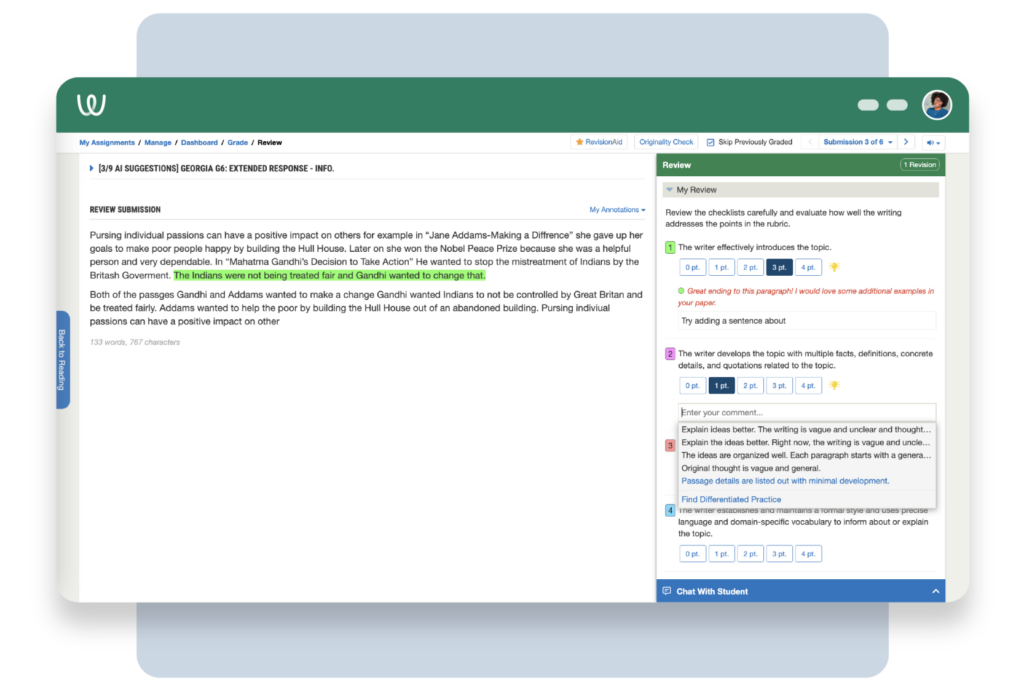
Image Source: Writable
Many AI teachers find it challenging to teach writing effectively. Writable helps solve this problem. The platform has a detailed solution that helps build lifelong writing skills for grades 3-12. Teachers save time on instruction and feedback.
Writable key features
Writable stands out from other AI teaching tools with its reliable writing support system:
AI-powered feedback tools: The platform gives applicable comments on student writing that teachers can customize. Students receive rubric-aligned suggestions in both English and Spanish
Individual-specific insights: The system analyzes writing patterns and suggests custom prompts that line up with students’ skill levels
1,000+ customizable prompts: Teachers can tailor assignments and rubrics for specific subjects, skill levels, or multilingual learners
Authorship verification: The platform has AI Checker and Draft History to track writing authenticity
The platform makes daily writing practice simple through Quick Writes. Students complete five-minute writing exercises as part of their regular instruction. Students can also respond through video, audio, and images.
Writable pricing
Students and teachers can choose from these pricing options:
Free: Teachers always get free accounts with a 30-day trial for students
Paid: Plans start at $1.00 per student per month with discounts available
Special promotion: A 1-year license purchased by May 2024 gives extended access through July 2025
Writable best use cases
Writable proves its value in several educational settings:
Daily writing practice: Teachers can customize Quick Writes based on student interests
Peer review facilitation: Students stay motivated with anonymous peer reviews
Multilingual support: Spanish-speaking students get translated assignments, readings, and rubrics
Writable’s excellence shows in its three CODiE awards for Best English Language Arts Solution and perfect 5/5 stars from Common Sense Education. The platform now serves over 16,000 schools and districts. Teachers consistently save time while their students improve their writing skills.
SchoolAI

Image Source: SchoolAI
SchoolAI elevates classroom AI integration by connecting teachers and students through a user-friendly platform. The system serves educators in over 1 million classrooms.
SchoolAI key features
SchoolAI creates customized learning paths [link_1] through these core components:
Spaces: Interactive learning environments let students learn at their own pace with individual instruction
Dot: An AI assistant helps plan lessons, design activities, and manage daily classroom tasks
Immediate monitoring: Teachers track student progress and identify struggling learners early
Chrome extension: AI works directly in Google Docs and web browsers without screen switching
The platform’s strict safety protocols alert teachers to critical issues like bullying or abuse.
SchoolAI pricing
SchoolAI comes in three tiers:
Free: Available to all teachers with access to 200,000+ premade Spaces, simple PowerUps, teacher insights, and FERPA/COPPA compliance
Pro: Schools get unlimited PowerUps, school-wide insights, learner profiles, and a dedicated success manager
Scale: Districts receive SIS-powered rostering, priority support, and custom data protection agreements
SchoolAI best use cases
SchoolAI proves valuable in several educational scenarios:
Time recovery: Teachers save 10+ hours each week
Differentiated instruction: Materials adapt to various learning needs
Small group facilitation: Students learn independently while teachers focus on specific needs
Quick intervention: Students receive help right when they need it
The platform appeals to educators who want to customize learning while building meaningful connections with students.
Turnitin
Image Source: Turnitin
Academic integrity has become crucial for AI teachers as these tools expand in education. Turnitin leads the industry in plagiarism detection and provides advanced capabilities to identify AI-generated content. Teachers can maintain originality standards effectively with these tools.
Turnitin key features
Turnitin provides complete tools that support teaching integrity:
Similarity detection: Identifies unoriginal content by comparing submissions against the world’s largest collection of internet, academic, and student paper content
AI writing detection: Analyzes text to spot content likely generated by AI tools like ChatGPT with accuracy rates of 96%-99%
Feedback Studio: Creates efficient grading while deterring plagiarism and building critical thinking skills
Integration capabilities: Works with all major learning management systems
Turnitin Clarity shows the whole writing process from first to final draft and builds trust between students and teachers.
Turnitin pricing
Turnitin’s licensing model focuses on institutions rather than individuals:
Institutional pricing: Schools pay around $3.00 per student yearly
Instructor account: Individual teachers pay $49.99 yearly for plagiarism and AI detection
Student account: Students pay $29.99 yearly for plagiarism checking only
Turnitin best use cases
AI teachers can use Turnitin effectively in several ways:
Upholding academic standards: Spots potential plagiarism and AI-generated content early
Teaching citation skills: Students learn proper attribution methods
Writing improvement: Teachers give detailed feedback through GradeMark and QuickMark tools
Building critical thinking: Students develop research and academic writing skills
Eduaide.AI

Image Source: Dang.ai
Eduaide.AI helps teachers prepare their lessons faster with AI-powered tools that work as their personal teaching assistant. The platform strengthens teachers’ capabilities while keeping human expertise at the vanguard of education.
Eduaide.AI key features
Eduaide.AI provides detailed support with over 100 AI-powered tools:
AI Lesson Plan Generator – Makes standards-arranged plans quickly with clear objectives and assessments
Rubric Builder – Creates well-laid-out rubrics with performance levels based on your criteria
Instructional Strategy Generator – Recommends different teaching approaches from asking-based to direct instruction
Activity Creator – Creates bell ringers, exit tickets, and group projects that match your subject
Resource Generator – Creates worksheets, quizzes, and prompts for any subject
Erasmus AI Assistant – Works as a content-aware educational chatbot that connects multiple tools smoothly
Eduaide.AI pricing
Eduaide.AI keeps its pricing available to everyone:
Free Plan – You get 15 generations monthly
Pro Plan – USD 5.99 monthly or USD 49.99 yearly
Institutional Plan – Schools and districts receive custom pricing
Eduaide.AI best use cases
Eduaide.AI stands out as one of the prominent AI teacher tools in several ways:
Efficient planning – Cuts down lesson preparation time by a lot
Differentiation support – Changes lesson complexity for ELLs, SPED, and gifted students
Administrative automation – Makes grading, feedback, and lesson planning quick and easy
Resource customization – Lets you customize materials to fit your curriculum and teaching style
ClassDojo

Image Source: App Store – Apple
Classroom management remains a significant challenge for ai teachers looking for quick solutions. ClassDojo meets this need with a detailed communication platform. The platform connects educators, students, and families through an easy-to-use interface. Today, 95% of US K-8 schools use this platform.
ClassDojo key features
ClassDojo changes classroom dynamics through several core components:
Behavior point system: Teachers can award or deduct points with customizable behaviors. Students receive distinctive sounds for quick feedback that tracks their progress
Real-time messaging: Parents and teachers can communicate directly through messages automatically translated into over 35 languages
Photo/video sharing: Teachers can share classroom moments through private story feeds
Student portfolios: Students can document and showcase their work
Teacher toolkit: The platform has attendance tracking, random student selector, timer, noise meter, and group maker
ClassDojo sends automated weekly behavior reports to parents. Teachers can use “Trendspotter” to analyze behavior patterns.
ClassDojo pricing
ClassDojo stays committed to accessibility:
Free core version: Schools, teachers, and families can access all basic features free forever
ClassDojo Plus: Families can opt for a premium subscription at approximately $7.99 monthly or $59.99 annually. This version provides extra at-home learning experiences
ClassDojo best use cases
Ai teachers find ClassDojo most valuable for:
Behavior management: Quick feedback helps reinforce positive behaviors
Parent engagement: Families stay connected with classroom activities easily
Time efficiency: Teachers can record behaviors quickly on desktop or mobile devices
Multilingual support: Automatic translations help bridge language barriers
PBIS implementation: Schools can better support positive behavior interventions
Speechify

Image Source: speechify.com
Text-to-speech technology gives AI teachers a great way to save time. Speechify turns written content into spoken audio so educators can absorb educational materials while they handle other tasks.
Speechify key features
Speechify comes with several capabilities that boost AI teaching:
High-quality voices – Over 200+ natural-sounding AI voices in 60+ languages
Adjustable playback speed – You can listen at up to 5x faster speeds to save time
Text highlighting – Visual tracking with audio improves comprehension
Offline listening – MP3 files are available to download for on-the-go access
Multi-platform support – The app works on iOS, Android, Mac, Chrome, and Safari
Speechify pricing
Speechify’s pricing structure is simple:
Free plan – Simple features with robotic voices, speed capped at 1.5x
Premium Monthly – $29.00/month unlocks all features
Premium Annual – $138.96/year ($11.58/month) provides better value
Speechify best use cases
AI teaching tools shine with Speechify in these areas:
Accessibility support – Students with dyslexia, ADHD, and visual impairments benefit greatly
Productivity improvement – Teachers review materials while handling other tasks
Language practice – Natural AI voices help with pronunciation and listening skills
Content adaptation – The tool converts PDFs, websites, textbooks, and Google Drive documents into audio
Teachers use Speechify to quickly process field trip forms, newsletters, and parent documentation. This lets them focus their attention on what matters most – interacting with students.
TalkingPoints
Image Source: TalkingPoints
Teachers working with different communities face unique challenges when getting families to participate. TalkingPoints helps bridge this gap with a multilingual platform that connects educators and families, whatever their language barriers might be.
TalkingPoints key features
TalkingPoints makes parent-teacher communication better through these capabilities:
Two-way translation in 150+ languages – Teachers write in English and families receive and respond in their home language
Text-first approach – Families only need simple text messaging capabilities, without a smartphone or WiFi
Multiple communication formats – You’ll find polls/surveys, video messages with translated captions, and document translation
Student messaging – Students ages 13+ can join conversations through secure collaboration
Attendance improvement tools – Immediate dashboard, targeted messaging, and automated absence notifications
TalkingPoints pricing
Teachers can easily access TalkingPoints through these options:
Free forever – Individual teachers can always use basic messaging features at no cost
School & District plans – Paid versions come with SIS integration, better translation, detailed analytics, and school/district-wide communication features
TalkingPoints best use cases
TalkingPoints makes family-school partnerships stronger:
Research shows TalkingPoints boosts parent participation by 87%, and all but one of these non-English speaking families report greater involvement in their child’s education. This increased participation is associated with better attendance and academic achievement.
The platform helps reach underserved families and promotes educational equity through meaningful two-way communication that builds trust between homes and schools.
Comparison Table
|
Tool Name |
Key Features |
Pricing |
Best Use Cases |
Notable Statistics |
|
• 60+ AI tools |
• Free: Simple access |
• Lesson planning |
• Present in nearly every U.S. district | |
|
Diffit |
• Reading-level adaptation |
• Free: 2,500-word limit |
• Mixed-ability classrooms |
• 96% report time savings |
|
Curipod |
• 30-second lesson generation |
• Free: 5 presentations |
• Student involvement |
Not specifically mentioned |
|
Gradescope |
• AI-assisted grading |
• Simple: $1/student |
• Large enrollment courses | |
|
Writable |
• AI-powered feedback |
• Free: Simple access |
• Daily writing practice |
• Serves 16,000+ schools |
|
SchoolAI |
• Interactive Spaces |
• Free: Simple access |
• Student support |
• Used in 1M+ classrooms |
|
Turnitin |
• Similarity detection |
• Institutional: ~$3/student/year |
• Plagiarism detection |
• 96-99% AI detection accuracy |
|
• 100+ AI tools |
• Free: 15 generations/mo |
• Quick planning |
Not specifically mentioned | |
|
ClassDojo |
• Behavior point system |
• Free: Core features |
• Behavior management |
• Used in 95% of US K-8 schools |
|
Speechify |
• 200+ AI voices |
• Free: Simple features |
• Accessibility support |
• Supports 60+ languages |
|
TalkingPoints |
• 150+ language translation |
• Free: Simple features |
• Family involvement |
• 87% improved parent involvement |
Conclusion
These 11 AI teacher tools can help you win back valuable teaching time. Teachers who use these tools save more than 3 hours every week. This extra time lets them do what they do best – connect with their students.
AI tools work best as helpful assistants that take care of repetitive tasks. This lets teachers focus on moments that really matter in the classroom. You’ll find tools like MagicSchool.ai‘s complete package and Diffit’s ability to customize content that can streamline your daily teaching tasks.
The range of available tools means you can pick what works for your classroom’s needs. You might find Gradescope’s quick grading system useful, or TalkingPoints’ ability to communicate with families in multiple languages helpful. Writable’s writing support or ClassDojo’s student behavior tools could be just what you need.
These AI assistants are a great help for teachers working with diverse learners. They can adjust content for different reading levels, language requirements, and learning approaches without hours of manual work. Teachers buried in paperwork can utilize automated grading, feedback, and planning features to cut down on administrative tasks.
Pick one or two tools that address your biggest challenges. This simple approach will help you save time quickly. Start small and add these tools gradually to your teaching routine. You’ll see how these AI assistants change your teaching while keeping your energy focused on building those important student connections that make education special.
✨ Notie AI – The AI that corrects your papers

