

A surprising 70% of teachers use online quizzes daily in their classrooms. The traditional process of creating these vital assessment tools demands countless hours of prep time.
AI test generators are reshaping this scene. The AI-driven education market will likely exceed $30 billion by 2032, mainly because these tools turn hours of assessment prep into mere seconds. Teachers looking for a detailed AI generator or a question generator will find tools that analyze their content and create relevant questions automatically.
Creating perfect quizzes comes with its challenges. AI quiz makers save precious time and improve student involvement while giving students enough practice before their final tests. Teachers can now build custom quizzes in minutes rather than hours and focus on what counts – accuracy and quality.
This piece covers everything about using AI test generators, from simple concepts to expert tips that help create perfect assessments for your classroom.
What is an AI Test Generator?

Image Source: iSpring Solutions
How AI quiz generators work
Content Analysis: The AI looks at your teaching materials—textbooks, lecture notes, videos, or PDFs—to spot key concepts, facts, and relationships.
Question Formulation: The system creates relevant questions that test material understanding based on this analysis.
Answer Creation: The AI develops correct answers and believable wrong choices for multiple-choice questions to test true comprehension.
Customization: Teachers can adjust difficulty levels, complexity, and question formats to match their specific needs.
Types of questions they can create
Today’s AI test generators can create many different question formats to test learning:
Multiple-choice questions: The standard format with one right answer among options True/False questions: Simple knowledge checks with accurate or incorrect statements Fill-in-the-blank: Questions where students supply missing key terms Short answer questions: Questions that ask for specific words, phrases, or sentences Essay questions: Questions that test deeper thinking through analysis Matching questions: Exercises where students pair related concepts Ordering questions: Tasks where students put items in sequence Scenario-based assessments: Real situations where students solve problems
AI vs traditional quiz creation
AI-powered quiz creation stands apart from traditional methods in several ways:
Time Efficiency: Research shows 63% of teachers who use AI quiz generators save 1-5 hours each week.
All the same, teachers must review the AI-generated content.
Why Teachers Should Use AI Quiz Tools
Save time on quiz creation
Online quizzes are becoming more popular. Creating them takes up too much preparation time.
Reduce human error
AI-powered platforms keep formatting consistent.
Adapt to different learning levels
AI quiz tools stand out because they can adapt to different learning needs.
This flexibility helps teachers manage classrooms where students learn at different speeds.
Personalize assessments
Teachers consider tailored learning the best approach, but it usually takes lots of resources. AI quiz generators make this easier through several features:
Content customization: Teachers can match assessments to their curriculum and include different difficulty levels for students .Interactive formats: Many platforms let teachers add images, audio, and videos to make quizzes more interesting . Immediate feedback: Students learn from their mistakes right away thanks to AI-powered automatic marking .Analytical insights: Teachers can spot learning gaps by looking at quiz results and adjust their teaching methods .
This kind of personalization gets students more involved in learning.
AI quiz tools have become valuable assets for today’s teachers because they save time, reduce errors, adapt easily, and offer personalization. As classrooms keep changing, these smart assistants help teachers maintain high-quality assessments. Teachers can then spend their valuable time where it matters most – interacting with students and creating tailored learning experiences.
How to Use an AI Quiz Generator Step-by-Step

Image Source: Stockimg AI
The right approach makes creating perfect assessments simple. This piece provides a step-by-step way to direct you through any ai test generator for teachers that will make your assessment creation process more efficient.
1. Choose your content source
AI quiz generators provide multiple ways to input your teaching material. You can choose from these options based on your needs:
Upload existing documents – Many platforms support various file formats including PDFs, Word documents, PowerPoints, and Excel sheets . This lets you reuse materials you’ve already created.Enter a topic – Type the subject, theme, chapter, or standard you teach, and the AI creates relevant questions .Paste text directly – Copy and paste excerpts from your notes, textbooks, or other materials into the platform .Provide a URL – Add links to websites, articles, research papers or online textbooks to generate questions from that content .Use YouTube videos – Some advanced platforms analyze video transcripts to create questions from educational videos .Connect to previous resources – Some systems let you base new quizzes on resources you’ve already created within the platform .
2. Select question types and difficulty
Your content source selection requires you to specify the type of assessment you want to create:
Choose question formats – Common options include:
- Multiple-choice questions
- Fill-in-the-blank questions
- True/False statements
- Short answer questions
- Essay/Open-ended prompts
Matching questions
Set difficulty levels – Many ai question generators for teachers let you adjust complexity from simple to advanced . Some platforms also support:- DOK (Depth of Knowledge) levels
- Bloom’s Taxonomy alignment
Lexile reading level adjustments
Specify quantity – Choose how many questions you need.
Most platforms offer between 5-20 questions per generation .
3. Customize and review questions
AI isn’t perfect, so reviewing generated content remains crucial:
Edit for accuracy – Check AI-generated questions for factual correctness .Questions from transcripts might contain errors, especially with technical terms .Refine wording – Fix any awkward phrasing or unclear questions to help students understand better .Add multimedia elements – Boost engagement with images, audio clips, or video segments in your questions .Align with objectives – Make sure questions match your learning goals by adjusting them to target specific skills or knowledge areas .Regenerate as needed – Most platforms let you regenerate questions until they meet your standards .
4. Export or assign the quiz
The final step gets your quiz to your students:
Choose your export format – Common options include:
- PDF files for printing
- Word/Google Docs for further editing
- CSV files for importing to other systems
Direct LMS integration
Integration options – Many ai generators for teachers connect with:
- Google Classroom
- Google Forms
- Microsoft tools
Learning Management Systems like Canvas, Moodle, or Blackboard
Share with students – Send through:
- Direct links
- Embedded codes for your website or blog
- Email distribution
Printed copies
Set assessment parameters – Set time limits, attempt restrictions, and other settings based on your platform .
These four simple steps help you utilize the full potential of AI quiz generators. You’ll create high-quality assessments quickly compared to manual creation.
8 Best AI Test Generators for Teachers

Image Source: Eklavvya
Finding the right AI test generator for your classroom can feel overwhelming with so many options available today. We’ve researched and put together eight top solutions that create high-quality educational assessments.
1. ChatGPT
OpenAI’s ChatGPT is a powerful AI tool that creates quizzes. You can generate questions about any subject at any difficulty level.
2. Conker.ai
3. QuizGecko
4. PrepAI
5. Quizlet
6. ClassPoint AI
7. Quizizz
8. Questgen
Tips to Create Better Quizzes with AI
Teachers need more than button-pushing skills to get the most out of AI test generators. Good quiz design leads to better assessment data and helps students participate more actively. Here are some proven ways to boost your AI-generated assessments.
Use Bloom’s Taxonomy for question depth
Quiz design becomes more powerful when you add Bloom’s Taxonomy to transform simple recall questions into critical thinking tools.
Mix question formats for participation
Students stay fresh when you mix things up.
Review AI-generated content for accuracy
AI systems still need human oversight despite their capabilities.
- Have verification through other credible sources
- Include all key information and viewpoints
Show the latest research available
Use multimedia for interactive learning
Learning retention improves significantly when multimedia elements come into play.
These targeted strategies will help your AI-generated quizzes do more than test knowledge—they’ll make the learning process better.
Advanced Features to Look For
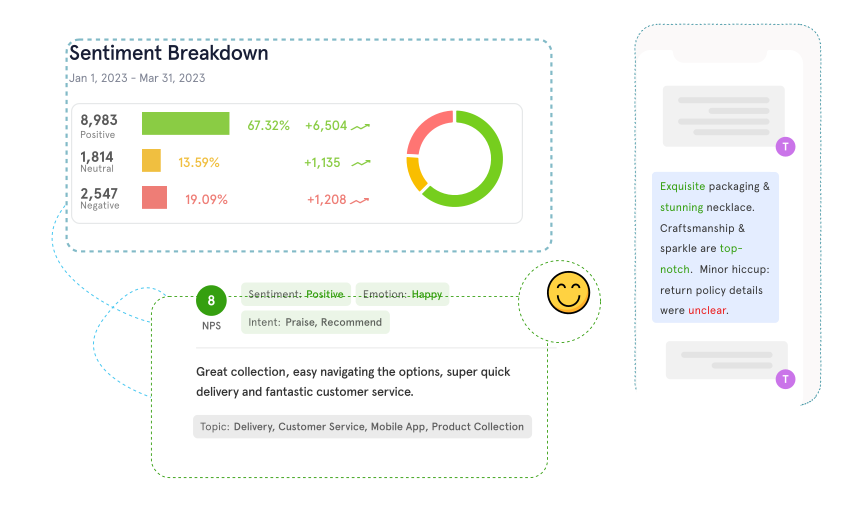
Image Source: Zonka Feedback
The best ai test generator for teachers goes beyond simple functions to provide advanced features that boost both teaching and learning. These four key features transform these tools from helpful additions to must-have resources.
Auto-grading and instant feedback
Analytics and performance tracking
Evidence-based insights turn assessment into a tool for improvement.
LMS integration and export options
A continuous connection with existing workflows is vital for teachers to adopt these tools widely.
Support for multiple languages
Modern tools come with multilingual support—from creating questions to navigating the interface.
Conclusion
AI test generators mark one of the most important advances for educators who want to create better assessments and save valuable time. This piece shows how these powerful tools can turn hours of quiz preparation into minutes of focused work. Teachers can spend less time on administrative tasks and more energy on what really counts – helping students learn and grow.
These platforms’ most valuable feature lets you customize difficulty levels, question types, and assessment formats. On top of that, they offer auto-grading, up-to-the-minute data analysis, and LMS integration that make daily classroom use much easier.
In spite of that, human oversight plays a vital role. Teachers should carefully review AI-generated content to ensure accuracy and proper lineup with learning goals. We suggest mixing AI’s efficiency with your professional judgment to build outstanding assessments.
These tools meet the growing need for individual-specific experiences. Students get consistent, well-crafted questions that target cognitive levels of all types, while teachers learn about student performance through detailed data.
AI test generators are a great way to get advantages for your assessment strategy, whether you’re starting with educational technology or you’re an experienced digital educator. You can follow our step-by-step process, try different platforms, and see how these tools revolutionize your assessment methods. Your students will appreciate the engaging, varied quizzes, and you’ll love getting back countless hours you used to spend creating quizzes.
✨ Notie AI – The AI that corrects your papers

