
Complete Online Grader Guide for Teachers: Save Hours While Improving Accuracy
Every week, you lose hours to grade calculations that a machine could handle in seconds. Meanwhile, the stack of ungraded papers grows, parent emails pile up, and your planning time evaporates. Online graders exist to give you that time back—and the best ones do far more than basic arithmetic.
Try Our Free Online Grader for Teachers
Enter total questions and wrong answers — get your grade instantly, in real time
Finally, an Online Grading Solution Built for Modern Educators
If you’ve spent another Sunday afternoon hunched over a calculator, converting raw scores to percentages and then mapping those to letter grades, you already know the frustration. Manual grading is time consuming, error-prone, and frankly beneath your professional expertise. You became a teacher to educate students, not to perform repetitive arithmetic.
The problem extends beyond wasted time. Manual calculation errors undermine student trust and parent confidence. A single misplaced decimal can turn a passing grade into a failing grade, triggering difficult conversations and grade appeals. Research confirms what you’ve experienced firsthand: teachers using manual calculations spend 5-10 hours weekly on grading tasks alone—time that could fuel lesson planning, individualized instruction, or simply rest.
Online graders eliminate this frustration entirely. These tools handle the mechanical work of grade calculation while you focus on what actually matters: understanding student learning and providing meaningful feedback. Whether you’re processing a 20-question math quiz or a complex final exam with weighted sections, an online grader delivers accurate results in seconds.
You can use the free interactive online grader tool at the top of this page right now. Enter your total number of questions, input wrong answers, and watch it calculate percentage scores and letter grades instantly. It’s completely free, requires no account, and works on any device. Consider it your always-available grading assistant.
Modern online grading tools have evolved far beyond simple percentage calculators. The best solutions now incorporate AI-powered feedback, rubric alignment, and integration with existing gradebook systems. Notie AI’s AI grading platform for teachers represents this evolution—transforming online grading from basic calculation into comprehensive assessment support that actually improves teaching practice.
Key Takeaways for Teacher Grade Management
Before diving into the details, here’s what every teacher needs to know about online grading tools:
- Time savings are substantial and measurable. Teachers using AI-enhanced grading tools report saving approximately six hours per week on grading tasks. That’s nearly a full planning day returned to your schedule.
- Accuracy exceeds manual calculation every time. Online graders eliminate the arithmetic errors that plague manual grading. No more misread numbers, calculator mistakes, or transcription errors affecting student grades.
- Consistency improves across all assessments. When you apply the same grading scale and rubric criteria through a digital tool, every student receives identical treatment—reducing bias complaints and grade appeals.
- Multiple grading scales work simultaneously. Whether your school requires traditional A-F letter grades, percentage scores, standards-based proficiency levels, or weighted grades for advanced courses, online graders adapt to your grading system.
- Mobile accessibility enables grading anywhere. Modern online graders feature responsive design for smartphones and tablets, letting you calculate test scores during planning periods, at home, or anywhere with internet access.
- Integration connects to existing workflows. Quality grading tools export to popular gradebook systems, accept batch uploads, and connect with learning management systems your school already uses.
- AI enhancement goes beyond calculation. The newest generation of online graders—led by solutions like Notie AI—provides rubric-aligned feedback, identifies learning patterns, and supports both formative and summative assessment.
Why Online Graders Transform Teaching Workflows
The shift from manual to online grading isn’t incremental improvement—it’s fundamental transformation of how assessment functions in your classroom.
Eliminate Calculation Errors That Damage Trust
Every experienced teacher has a story about a grade calculation error. Maybe you added a column incorrectly and had to issue corrections to an entire class. Perhaps a misplaced decimal point turned a student’s B into a D, prompting an uncomfortable parent meeting. These errors happen because humans aren’t calculators—and we shouldn’t pretend otherwise.
Online graders remove human arithmetic from the grading process entirely. When you enter that a student got 7 wrong answers on a 25-question test, the tool calculates the exact percentage (72%) and maps it to your grading scale instantly. No mental math, no fat-finger errors, no second-guessing your calculations.
Reduce Grading Time from Hours to Minutes
Consider the math on a single 30-question quiz for a class of 28 students:
Manual process: Count correct answers for each paper (30 seconds each), calculate percentage (15 seconds), look up letter grade on your grading chart (10 seconds), record in gradebook (15 seconds). That’s roughly 70 seconds per student, or about 33 minutes for one class—assuming no interruptions or rechecks.
Online grader process: Enter wrong answers for each student (5 seconds each), let the tool calculate everything instantly. Total time: under 3 minutes.
Multiply this across multiple classes and daily assessments, and the time savings become substantial. Teachers consistently report that batch processing capabilities reduce full-class grading from 30+ minutes to under 5 minutes.
Provide Instant Feedback for Formative Assessment
The educational research is clear: feedback is most effective when delivered immediately. Yet traditional grading workflows create delays between assessment and feedback—sometimes days or weeks for complex assignments.
Online graders enable instant results during class. Run a quick quiz, input responses, and share percentage scores before the bell rings. Students see their academic performance while the content remains fresh, enabling immediate correction of misconceptions.
Advanced AI-powered graders like Notie AI’s AI essay grader extend this further by generating specific feedback tied to rubric criteria. Instead of just showing a score, students understand exactly where they excelled and where they need improvement.
Support Multiple Grading Scales Without Confusion
Your district uses percentage grades, but the elementary school across town uses standards-based proficiency levels. The AP courses require weighted grades, while your standard sections don’t. Different subjects have different cutoff points for letter grades.
Manual grading across these systems creates confusion and errors. Online graders handle multiple grading scales seamlessly. Configure your custom grade scale once—whether it’s a traditional 10-point scale, a 7-point scale, or a standards-based system—and the tool applies it consistently across all assessments.
Enable Consistent Practice Across Teachers
When three teachers grade the same assessment differently, students and parents notice. Grade inconsistency breeds frustration and perceptions of unfairness.
Online graders enforce consistency by applying identical calculations to identical inputs. When your entire department uses the same grading scale and rubric structure, every section of the same course produces comparable results. This matters especially for high-stakes assessments where grade differences affect student placement or academic records.

How Online Grading Tools Work for Teachers
Understanding the mechanics helps you maximize efficiency. Here’s the straightforward process:
Step 1: Input Assessment Details
Begin by defining your assessment parameters. For a basic quiz, enter the total number of questions. For point-based systems, enter total points possible. The free online grader tool on this page accepts both approaches.
Next, configure your grading scale to match your school’s requirements. Common setups include:
- Traditional 10-point scale: 90-100 = A, 80-89 = B, 70-79 = C, 60-69 = D, below 60 = F
- 7-point scale: 93-100 = A, 85-92 = B, 77-84 = C, 70-76 = D, below 70 = F
- Plus/minus grading: A+ = 97-100, A = 93-96, A- = 90-92, and so on
- Standards-based: Exceeds (4), Meets (3), Approaching (2), Beginning (1)
Most online graders let you save custom scales for repeated use. Configure once for your district requirements, then apply instantly to every assessment.
Step 2: Calculate Student Scores
With parameters set, input student performance data. The simplest approach: enter the number of wrong answers per student. The grader calculates correct answers, determines the percentage score, and maps to your grading scale automatically.
For assessments with varying question values, enter points earned per student instead. The tool handles partial credit, half points, and decimal precision based on your settings.
Batch processing accelerates this further. Instead of entering one student at a time, upload a spreadsheet with all student responses. The grader processes the entire class simultaneously, returning a full grade chart with every student’s percentage grades and letter grades—much like instant AI grading platforms that grade in 30 seconds.
Advanced graders add intelligence here. Notie AI’s AI teaching platform, for example, can analyze response patterns to identify common mistakes across your class—showing that 80% of students missed question 7, suggesting a teaching gap worth addressing.
Step 3: Apply Results to Grade Books
Calculated grades need to reach your official records. Quality online graders support multiple export options:
- CSV/Excel export: Download results as a spreadsheet for import into any gradebook system
- Direct LMS integration: Sync automatically with Canvas, Schoology, Google Classroom, or other platforms your school uses
- PDF grade charts: Generate printable summaries for your records or parent conferences
The free grader tool on this page provides instant results you can record manually or screenshot for reference. Premium solutions like Notie AI offer direct integration with popular learning management systems, eliminating double-entry entirely.
Essential Features Every Teacher Needs
Not all online graders are created equal. Here’s what separates useful tools from frustrating ones:
Customizable Grading Scales
Your grading workflow depends on scales that match your context. Essential scale features include:
- Adjustable letter grade boundaries (change the A cutoff from 90 to 93, for example)
- Support for plus/minus grades when your school uses them
- Standards-based options for elementary and competency-focused settings
- Weighted grades for calculating honors or AP adjustments
- Pass/fail conversion for certain assessment types
The wrong grading scale produces wrong grades. Tools that lock you into one scale waste your time with manual conversions.
Batch Grading Capabilities
Processing one student at a time is inefficient. Look for:
- Multi-student input screens where you enter an entire class’s scores at once
- Spreadsheet upload for importing existing data
- Class roster integration so student names auto-populate
- Group processing for grading multiple sections simultaneously
Mobile-Responsive Design
Grading doesn’t always happen at your desk. The best tools work seamlessly on tablets and smartphones, letting you:
- Calculate scores during planning periods using your phone
- Grade from home without needing your school computer
- Input results directly after observing student work
- Access grade charts during parent conferences
Integration With Existing Systems
Standalone tools that don’t connect to your gradebook create extra work. Evaluate:
- LMS compatibility (Canvas, Schoology, Google Classroom, Blackboard)
- SIS export options (PowerSchool, Infinite Campus, etc.)
- API availability for custom integrations
- Standard file format support (CSV, Excel, XML)
Detailed Reporting and Visualization
Numbers alone don’t tell the full story. Useful reporting includes:
- Grade distribution charts showing class performance at a glance
- Individual student reports for conferences and interventions
- Question-level analysis identifying which items students missed most
- Trend tracking across multiple assessments over time
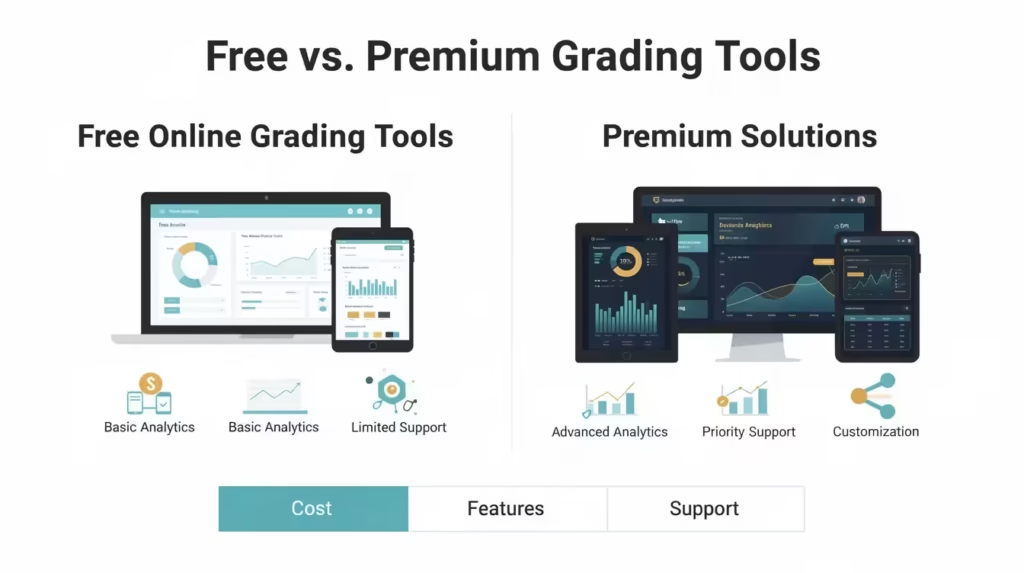
Free Online Grading Tools vs. Premium Solutions
The grading tool market ranges from simple free calculators to comprehensive paid platforms. Understanding the differences helps you choose appropriately.
Basic Free Calculators
Tools like the free grader on this page, EZ Grader, and similar options provide essential calculation:
Strengths:
- Completely free to use, no account required
- Simple interface with minimal learning curve
- Fast percentage and letter grade calculation
- Works instantly in any web browser
Limitations:
- No rubric support for complex assessments
- Limited or no feedback generation
- No integration with gradebooks or LMS
- Cannot handle subjective grading components
- No batch processing for large classes
Best for: Quick quizzes, simple tests, occasional grading needs where you just need the math done.
Mid-Tier Solutions
Products like QuickGrade and QuickGrade Pro add features beyond basic calculation:
Strengths:
- Support for custom grade scales and partial credit
- Half points and decimal precision options
- Mobile-responsive interfaces
- Multiple classes and assessment types
- Reasonable pricing for individual teachers
Limitations:
- Limited AI assistance or feedback generation
- Basic integration options
- No handwritten work processing
- Minimal analytics or insights
Best for: Teachers who grade frequently and need more flexibility than basic calculators provide.
Premium AI-Powered Platforms
Solutions like Gradescope, Pensieve, and Notie AI represent the current leading edge, similar to broader AI grading tools that can cut grading time in half:
Strengths:
- Full rubric-based scoring with detailed criteria
- AI-generated feedback aligned to learning objectives
- Batch processing with intelligent grouping
- Handwritten work recognition via OCR
- Deep LMS and gradebook integration
- Analytics identifying learning patterns
- Multi-grader support for department consistency
Considerations:
- Subscription or licensing costs
- Learning curve for full feature utilization
- May require institutional adoption for maximum benefit
Best for: Teachers with heavy grading loads, complex assessments, or need for detailed feedback beyond simple scores.
Where Notie AI Fits
Notie AI occupies a unique position by combining the accessibility of simpler tools with the power of AI-enhanced grading. Unlike basic calculators that stop at percentage scores, Notie AI:
- Generates rubric-aligned feedback explaining each grade
- Processes diverse assessment types including essays and open responses
- Integrates directly with popular learning management systems
- Provides actionable insights about student learning patterns
- Maintains human oversight while automating routine calculations
For teachers ready to move beyond simple ez grader calculator functionality, Notie AI represents the comprehensive solution that actually improves teaching practice—not just speeds up arithmetic.
Understanding Online Grading Scales for Different Grade Levels
Grading expectations vary dramatically across K-12. Your online grader needs to accommodate these differences.
Elementary School Grading (K-5)
Elementary assessment often emphasizes growth over comparison. Common approaches include:
Standards-Based Grading Scales:
- 4 = Exceeds Standard / Advanced
- 3 = Meets Standard / Proficient
- 2 = Approaching Standard / Developing
- 1 = Below Standard / Beginning
Converting Traditional Scores:
When assessments produce percentage scores but your report card uses standards-based levels, you need clear conversion rules. A typical mapping:
- 90-100% → 4 (Exceeds)
- 75-89% → 3 (Meets)
- 60-74% → 2 (Approaching)
- Below 60% → 1 (Below)
Configure your online grader with these custom boundaries rather than defaulting to traditional letter grades that don’t match elementary reporting.
Narrative Feedback Focus:
Elementary grades often accompany detailed narrative feedback. While basic calculators can’t generate this, AI-powered tools like Notie AI can produce age-appropriate feedback statements tied to specific learning standards.
Middle School Grading (6-8)
Middle school represents a transition zone with mixed practices:
Emerging Traditional Scales:
Many middle schools begin using A-F letter grades while maintaining some standards-based elements. Students and parents start seeing GPA calculations for the first time.
Balancing Formative and Summative:
Middle school assessment mixes frequent formative checks (graded but low-stakes) with periodic summative tests. Your online grader should handle both quickly:
- Daily quizzes: Quick percentage calculation, minimal formal recording
- Unit tests: Full grade scale application with gradebook integration
- Projects: Rubric-based scoring with multiple criteria
Differentiated Weighting:
Some middle schools weight categories differently (tests worth more than homework, for example). Premium graders support weighted grades while basic tools don’t—requiring manual calculation of final grades.
High School Grading (9-12)
High school grading carries the highest stakes, with grades affecting transcripts and college admission, which is why many educators adopt specialized AI tools built for high school teachers:
GPA Calculations:
Both weighted and unweighted GPAs matter. Weighted grades give extra points for honors, AP, or IB courses:
- Standard course A = 4.0
- Honors course A = 4.5
- AP/IB course A = 5.0
Your grading tool should either calculate weighted averages directly or export data cleanly for GPA calculation elsewhere.
Rigorous Scale Application:
High school often uses tighter grading scales. A traditional 10-point scale might become 7-point or stricter for advanced courses. Some schools curve grades based on class performance.
Online graders handling high school work need:
- Flexible scale configuration
- Curved grading options
- Extra credit accommodation
- Late penalty calculations
- Test retake policies
College Readiness Emphasis:
High school grading increasingly emphasizes skills colleges expect: rubric-based assessment, detailed feedback, multiple revision opportunities. Basic calculators can’t support this depth. AI-powered tools like Notie AI align with this direction by generating the kind of specific, criterion-referenced feedback that prepares students for college-level expectations.
Time-Saving Strategies for Efficient Online Grading
The tool matters, but technique matters too. Here’s how experienced teachers maximize efficiency, especially when using modern homework grading AI tools:
Keyboard Shortcuts and Quick-Input Methods
Most online graders support faster input than mouse-clicking:
- Tab between fields rather than clicking each one
- Number pad entry for rapid score input
- Enter to advance to the next student automatically
- Bulk paste from spreadsheets when available
Learning these shortcuts for your specific tool can cut input time in half.
Batch Processing Techniques
Never grade one student at a time when batch options exist:
- Prepare a simple spreadsheet with student names and scores
- Copy the score column directly
- Paste into your grader’s batch input feature
- Export all results simultaneously
This approach scales beautifully. Whether you have 25 students or 150 across multiple sections, batch processing keeps time consistent.
Reusable Grading Templates
Set up templates for assessments you give repeatedly:
- Weekly quiz template: 10 questions, standard grading scale, homework category
- Unit test template: 50 points, weighted toward test category, detailed rubric
- Writing assignment template: Rubric criteria pre-defined, feedback prompts ready
Notie AI excels here by saving rubric templates that auto-apply to similar assignments, generating consistent feedback without repeated setup.
Integration Workflows
Eliminate double-entry by connecting your grading tool to existing systems:
- Pull roster data from your LMS rather than re-entering names
- Push grades directly back to the gradebook after calculation
- Sync assignment structures so you’re not recreating tests in multiple places
- Automate exports on a schedule if direct integration isn’t available
Teachers who invest time in integration setup report the investment pays back within weeks through eliminated manual transfers.
Real Classroom Examples Across Grade Levels
Theory becomes practical through specific scenarios. Here’s how online grading plays out in real classrooms:
Third-Grade Math Quiz: 20 Students, 10 Questions
Scenario: Ms. Rodriguez gives weekly multiplication fact quizzes. Each quiz has 10 problems, and she needs to record results in her standards-based gradebook.
Without an online grader: She counts correct answers for each paper, converts to a proficiency level (8-10 correct = Proficient, 6-7 = Approaching, etc.), and manually enters 20 grades. Time: approximately 15 minutes.
With the free grader on this page: She enters “10” for total questions, then quickly inputs wrong answers per student: 2, 0, 3, 1, 4… The tool shows percentage scores instantly. She maps these to her standards-based levels and enters results. Time: under 5 minutes.
With Notie AI: The tool accepts her proficiency-level grading scale directly, auto-maps scores to the correct level, and exports directly to her LMS. Time: 3 minutes including export.
Seventh-Grade Science Test: Varying Point Values
Scenario: Mr. Chen’s unit test has 30 questions: 20 multiple choice worth 1 point each, 5 short answer worth 3 points each, and 2 extended response worth 10 points each—55 total points.
The challenge: Different question types with different point values complicate percentage calculation. A basic ez grader assuming equal points per question produces wrong results.
Solution: Mr. Chen uses a grader that accepts total points rather than just total number of questions. He enters 55 as the maximum, then inputs each student’s earned points. The tool calculates precise results: a student earning 42 points receives a 76.4%, mapping to a C on his scale.
For the extended response questions, he needs rubric support. Notie AI allows him to score each criterion (scientific accuracy, explanation clarity, evidence use) and automatically calculates the combined score with his configured weighting.
High School English Essay: Rubric-Based Scoring
Scenario: Ms. Thompson assigns a literary analysis essay to her 11th-grade class. Her rubric includes four criteria: thesis/claim (25 points), textual evidence (30 points), analysis depth (30 points), and conventions (15 points).
Basic grader limitation: Simple calculators can’t handle multi-criterion rubrics. She’d have to calculate criterion scores separately, sum them, then convert to a percentage.
Premium solution: Gradescope or Notie AI lets her define the rubric structure, score each criterion per student, and automatically calculate totals. More importantly, these tools generate feedback tied to each rubric level—explaining why a thesis scored 20/25 rather than just showing the number.
AI advantage: Notie AI goes further by suggesting feedback language based on the score level and rubric descriptors. Instead of writing “Your thesis needs more specificity” thirty times, the AI generates appropriate feedback that Ms. Thompson can review and adjust. Studies show this approach saves approximately 65% of grading time compared to fully manual scoring.
College-Level Exam: Curved Grading Implementation
Scenario: Professor Williams teaches Organic Chemistry to 150 students. The midterm exam results show a class average of 58%, indicating the test was more difficult than intended.
Curving challenge: He wants to adjust scores so the median becomes a C (73%). Manual curving for 150 students across multiple exam sections creates opportunity for errors.
Grading tool solution: He uploads all scores to a grading platform that calculates the necessary adjustment. The tool shows that adding 15 points to each raw score achieves his target distribution. He can visualize the pre-curve and post-curve distributions before committing.
Transparency feature: The tool generates a clear explanation of the curving methodology that he can share with students, preventing the “why did they get a different curve” confusion that plagues manual implementations.
Common Grading Challenges and Online Solutions
Even experienced teachers encounter grading situations that seem difficult to handle systematically. Here’s how online tools address common challenges:
Handling Partial Credit and Complex Rubrics
Challenge: Students earn partial credit on multi-step problems, but your grading scale assumes whole points.
Solution: Use a grader that supports decimal precision and partial credit settings. QuickGrade Pro, for example, allows half points and quarter points. Notie AI handles arbitrary point values including decimals.
Configure your rubric with specific point allocations per criterion level. Instead of “4 = Excellent, 3 = Good, 2 = Fair, 1 = Poor,” define “4 = Meets all criteria, 3.5 = Meets most criteria with minor gaps, 3 = Meets basic requirements,” and so on.
Managing Different Scales Across Subjects
Challenge: You teach both standard and honors sections, or your department uses different scales than another.
Solution: Save multiple grading scale configurations in your tool. Apply the appropriate scale to each class or assessment type. Most schools require documentation of which scale applies to which course—your grader’s saved configurations serve as this documentation.
Makeup Exams and Late Assignment Calculations
Challenge: Makeup work and late submissions require point deductions or different scoring treatment.
Solution: Apply late penalties after initial calculation. If your policy deducts 10% for late work, calculate the original score first, then reduce by 10%. Document both scores—the original earned score and the late-penalized final grade.
Some graders automate this with “late penalty” fields. Notie AI tracks submission timestamps and can auto-apply configured penalties based on your class policy.
Maintaining Consistency Across Multiple Teachers
Challenge: Three teachers give the same final exam but produce different grade distributions.
Solution: Use shared rubrics and grading scales in a platform all teachers access. Gradescope’s multi-grader feature, for example, lets teachers grade specific questions while the platform ensures identical rubric application.
Regular calibration sessions help too. Grade the same sample papers independently, compare results, and discuss discrepancies. Online tools make this easier by tracking which teacher graded which response.
The Future of AI-Powered Grading for Teachers
Online grading has evolved from simple calculators to intelligent systems that genuinely improve teaching practice. Here’s where the technology is heading:
Beyond Calculation to Comprehensive Feedback
Basic grade calculators answer one question: “What score did this student earn?” AI-powered graders answer richer questions:
- Why did the student earn this score?
- What specific strengths appear in this work?
- What specific improvements would raise the score?
- How does this performance compare to the student’s trajectory?
Studies show AI grading tools achieve approximately 95% agreement with human graders on high-confidence assessments while reducing grading time by 65%. This isn’t replacement of teacher judgment—it’s amplification of teacher capacity.
Automated Rubric Application
Manual rubric application is tedious: read student response, consider each criterion, assign levels, write justification. AI systems now handle the initial evaluation, flagging responses where the AI is less confident for teacher review.
The GradeHITL framework, for example, uses AI to pose clarifying questions to teachers, refining rubric criteria dynamically until human-level grading accuracy is achieved. This human-in-the-loop approach maintains teacher authority while accelerating throughput.
Predictive Analytics for Early Intervention
Next-generation grading tools don’t just score current work—they identify patterns predicting future struggles. A student whose scores on formative assessments show a specific error pattern may need intervention before the summative exam.
These insights help teachers move from reactive (responding to poor grades after the fact) to proactive (addressing learning gaps before they become grade problems).
Where Notie AI Leads
Notie AI’s snap-photo AI grader embodies these future directions today:
- Rubric-aligned feedback generated automatically, reviewed by teachers
- Handwritten work processing through computer vision
- Confidence scoring that flags low-certainty grades for human attention
- Integration with major learning management systems
- Detailed reports identifying both individual and class-wide patterns
The shift from basic calculators to AI-powered grading represents the same leap that word processors represented over typewriters. The fundamental task remains the same—evaluating student work—but the capability and efficiency transform entirely.
Frequently Asked Questions
How accurate are online graders compared to manual calculation?
For objective calculations (percentage scores, letter grade mapping), online graders are functionally 100% accurate assuming correct input. Human mental math and calculator use introduce errors that digital tools eliminate.
For AI-enhanced grading of subjective work, accuracy depends on task type. Studies show approximately 95% agreement with human graders on high-confidence assessments like rubric-based scoring of well-defined criteria. Lower agreement occurs on highly subjective elements like creative writing or nuanced argument evaluation—which is why human oversight remains essential.
Can online graders handle complex rubrics and weighted assignments?
Basic calculators cannot. Premium tools like Gradescope and Notie AI fully support multi-criterion rubrics with different point allocations per criterion. Weighted grades (where tests count more than homework, for example) require category-level weighting that most LMS gradebooks handle or that premium graders support through export formatting.
What’s the difference between free and paid grading tools?
Free tools (including the grader on this page, EZ Grader, basic calculators) handle percentage conversion and simple grading scale application. They lack rubric support, feedback generation, batch processing, and system integration.
Paid tools add rubric-based scoring, AI-generated feedback, batch processing for large classes, direct gradebook integration, analytics, and features like handwritten work recognition. The investment makes sense for teachers with heavy grading loads or need for detailed, specific feedback.
How do I choose the right grading scale for my classroom?
Match your district requirements first—most schools specify grading scales in policy documents. Beyond that, consider:
- Elementary: Standards-based scales align with developmental assessment philosophy
- Middle/High: Traditional scales with clear communication about boundaries
- Advanced courses: Weighted scales that reflect increased rigor
- Specific subjects: Some disciplines (art, physical education) may use alternative scales
Configure your chosen scale in your grading tool so it applies consistently across all assessments.
Are online grading tools secure for student data?
Reputable tools comply with FERPA (in the United States) and GDPR (in Europe), using encrypted data transmission and secure storage. Before adopting any tool, verify:
- Privacy policy clarity on data use
- Compliance certifications relevant to your jurisdiction
- Data retention and deletion practices
- Whether student work is stored and for how long
Free tools with unclear privacy policies may store data inappropriately. Institutional tools like Notie AI typically undergo security review before school adoption.
Can I use online graders with my existing gradebook system?
Most quality graders support export to CSV or Excel, which virtually all gradebook systems can import. Direct integration varies—Canvas, Schoology, and Google Classroom have the most third-party integration support.
The free tool on this page provides instant results for manual recording. Notie AI offers direct integration with major learning management systems, eliminating export/import steps entirely.
What about partial credit and subjective grading components?
Partial credit requires tools that accept point values rather than just question counts. Premium graders support fractional points, multiple criteria per question, and rubric-based scoring where each criterion earns separate partial credit.
Subjective components (essays, open responses) need rubric support and ideally AI assistance. Notie AI can generate initial feedback and scores for subjective work, flagging low-confidence evaluations for teacher review. This maintains teacher judgment while handling routine evaluation efficiently.
Why Notie AI Replaces Traditional Online Graders Entirely
Basic online graders solved a simple problem: teachers needed faster arithmetic. Enter total questions and wrong answers, receive a percentage and letter grade. For quick quizzes and simple tests, that’s sufficient.
But most grading isn’t simple. You’re evaluating essays with multiple rubric criteria. You’re providing feedback that actually helps students improve. You’re tracking patterns across assessments to identify students who need intervention. You’re managing weighted categories, partial credit, and multiple grading scales simultaneously.
Basic calculators can’t help with any of that. They stop at the percentage score, leaving you to handle everything else manually.
Notie AI’s AI grading for teachers picks up where calculators stop:
Rubric-aligned feedback generation: Instead of writing the same comments repeatedly, Notie AI generates specific feedback tied to your rubric criteria. A thesis scored at level 3 receives feedback explaining exactly what would raise it to level 4—language you can use directly or customize as needed.
Comprehensive assessment support: Essays, short answers, problem sets, lab reports—Notie AI handles assessment types that require more than counting correct answers. Computer vision processes handwritten work. Natural language processing evaluates written responses against your criteria.
Time savings that matter: Teachers using AI-enhanced grading report saving approximately six hours per week. That’s not just calculation time—it’s feedback writing time, consistency-checking time, grade-curve-calculating time. Real hours returned to your week.
Integration that eliminates double-entry: Direct connections to Canvas, Schoology, Google Classroom, and other platforms mean grades flow from Notie AI to your gradebook automatically. No export files, no manual transcription, no opportunities for transfer errors.
Actionable insights beyond grades: See which rubric criteria your class struggles with most. Identify students whose performance trajectory suggests they need support. Understand patterns across assessments that would take hours to analyze manually.
The evolution from ez grader to Notie AI parallels the evolution from calculators to spreadsheets to analytics platforms. Each generation didn’t just speed up the previous approach—it enabled entirely new capabilities.
If you’re still using basic online graders for anything beyond the simplest quizzes, you’re working harder than necessary. The tools exist to handle routine evaluation while you focus on the judgment, relationships, and instruction that actually require your expertise.
The free grader tool at the top of this page handles immediate calculation needs. When you’re ready for grading that truly transforms your workflow—feedback generation, rubric alignment, integration, insights—Notie AI is the modern solution built for how teachers actually work.
Stop calculating. Start teaching. Let the tools handle the arithmetic while you focus on the students.
✨ Notie AI – The AI that corrects your papers